How Java I/O Evolved from BIO to NIO and AIO
In Java, input and output are not peripheral features. File access, network communication, server-side request handling, and many middleware components all depend on I/O behavior. As Java has evolved, its I/O programming models have also changed to meet different concurrency and performance requirements.
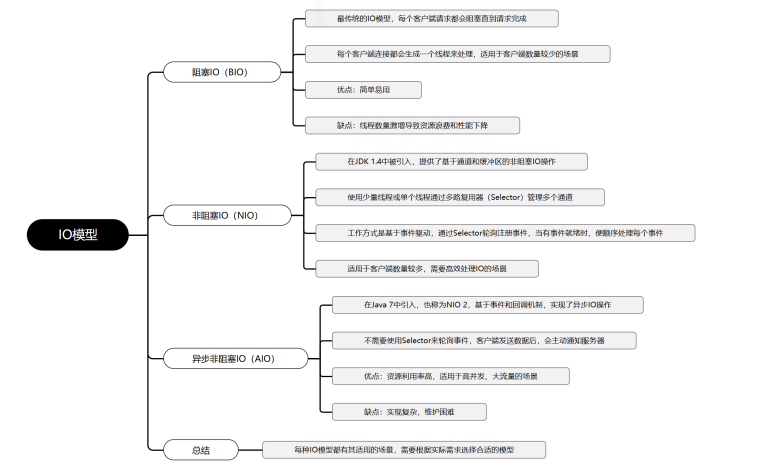
The three models most often discussed are BIO, NIO, and AIO:
- BIO: blocking I/O, the traditional stream-based model.
- NIO: non-blocking or multiplexed I/O, built around Channel, Buffer, and Selector.
- AIO: asynchronous I/O, where the operation can complete in the background and notify the application later.
Synchronous and asynchronous I/O
Before looking at BIO, NIO, and AIO separately, it is useful to clarify the difference between synchronous and asynchronous I/O. These two ideas describe how an application initiates an I/O operation and how it waits for the result.
Synchronous I/O
In a synchronous I/O model, a user-space thread or process actively starts an I/O request and then waits for the operation to finish. During this waiting period, the thread is blocked. It cannot continue with later logic until the I/O operation completes and returns a result.
Its main characteristics are:
- Blocking behavior: while the I/O operation is running, the user thread is suspended and cannot perform other work.
- Simple programming model: the execution flow is direct and easy to understand.
- High resource cost under concurrency: if each connection needs its own thread, a large number of concurrent connections will consume many threads and a large amount of memory.
Synchronous I/O is suitable for systems with modest concurrency, or for scenarios where resource usage is not the main concern. In Java, traditional BIO is a typical synchronous I/O model.
Asynchronous I/O
In an asynchronous I/O model, the user thread starts an I/O request and returns immediately. It can continue executing other logic while the actual I/O work is completed by the kernel or another thread in the background. When the operation finishes, the result is usually delivered through a callback or some other notification mechanism.
Its main characteristics are:
- Non-blocking behavior: after submitting the I/O request, the user thread does not have to wait.
- Higher efficiency: it can improve concurrent processing capacity and reduce the need for thread resources.
- Greater complexity: callbacks, event notifications, and asynchronous control flow make the programming model harder than direct synchronous code.
Asynchronous I/O is a better fit for high-concurrency systems and performance-sensitive services. In Java, NIO and AIO both support forms of asynchronous-style I/O. AIO, in particular, provides complete asynchronous I/O support, allowing operations to proceed without blocking the user thread.
The choice between synchronous and asynchronous I/O depends on the system requirements. For high concurrency and low latency, asynchronous I/O is usually more appropriate. For simpler systems with limited concurrency, synchronous I/O is often easier and more practical.
BIO: blocking I/O
Before JDK 1.4, BIO was the standard way to write network programs in Java. Its most obvious feature is that each client connection is normally handled by a dedicated thread. This works well when there are only a few clients. But as the number of clients grows, the number of threads also grows quickly, causing resource waste and performance degradation.
A common improvement is to introduce a thread pool. A thread pool reuses thread resources and limits the total number of live threads. However, this does not remove the fundamental problem. If most client connections are long-lived, threads can remain occupied for a long time, leaving no idle threads to process new connections.
Traditional Java I/O is stream-based. It uses byte streams and character streams for input and output. In large-scale concurrent scenarios, each request may occupy an independent thread, which can lead to wasted thread resources and eventually become a performance bottleneck.
Before using asynchronous models, a common development pattern was to obtain data from multiple services through synchronous calls:

In a synchronous calling process, the total response time of an interface can become very long. If data must be obtained from many services, the total time is usually greater than T1 + T2 + T3 + ... + Tn. To reduce latency, developers often use thread pools to fetch data in parallel.

This approach improves response time, but resource utilization is still not ideal for two reasons:
- A large amount of CPU capacity is wasted while threads are blocked and waiting. Before Java 8, callbacks were often used to reduce blocking, but heavy callback usage could easily create the well-known callback hell problem, making code harder to read and maintain.
- More concurrency often means more thread pools. As the number of scheduled threads increases, resource competition becomes more serious. Valuable CPU time is consumed by context switching, and each thread itself occupies system resources. Threads cannot be increased indefinitely.
In a purely synchronous model, hardware resources are not fully utilized, and system throughput can quickly hit a bottleneck.
NIO: synchronous non-blocking I/O and multiplexing
The asynchronous flavor of NIO mainly appears in its non-blocking I/O operations. Unlike traditional blocking I/O, Java NIO allows one thread to handle I/O operations for multiple connections without blocking that thread on each connection. This greatly improves concurrent processing capacity and reduces thread consumption.
Java NIO was introduced in Java 1.4 under the java.nio package. It provides abstractions such as Channel, Selector, and Buffer. The N in NIO is often understood as Non-blocking rather than merely New. NIO is buffer-oriented and channel-based, and is suitable for high-load, high-concurrency network applications.
Java NIO is commonly understood as an I/O multiplexing model. Many developers also classify it as a synchronous non-blocking I/O model.
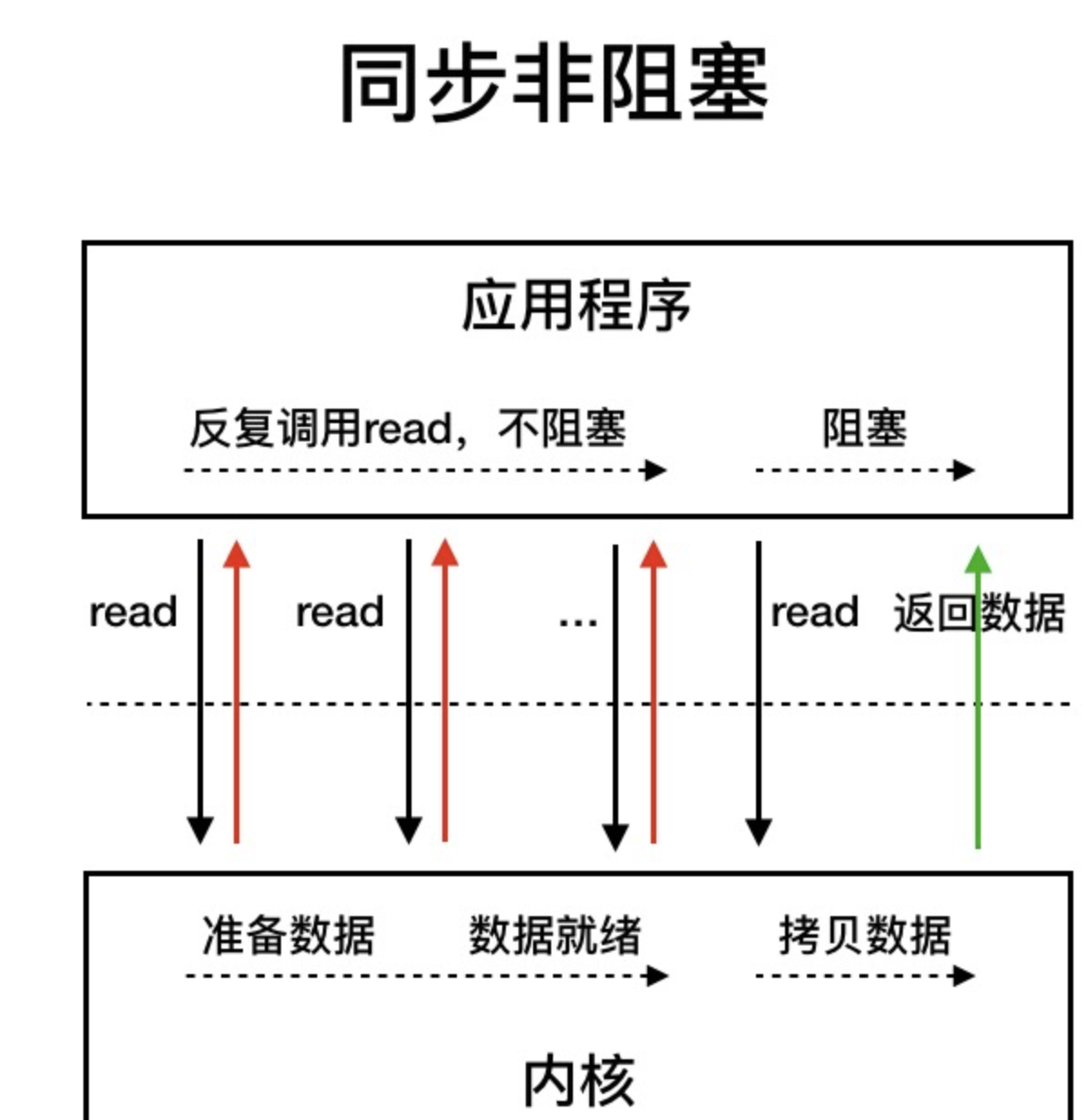
In a synchronous non-blocking I/O model, the application repeatedly initiates read calls. The thread is still blocked during the stage where data is copied from kernel space to user space, but the model avoids being blocked for the entire waiting period before data is ready.
Compared with synchronous blocking I/O, this is already a major improvement. Polling avoids constant long blocking. However, polling itself has a cost: repeatedly making I/O system calls to ask whether data is ready consumes CPU resources.
This is where I/O multiplexing becomes important.

In an I/O multiplexing model, a thread first calls select to ask the kernel whether data is ready. When the kernel has prepared the data, the user thread then initiates the read call. The read process, which copies data from kernel space to user space, is still blocking.
System calls that support I/O multiplexing include select, epoll, and others:
selectis supported by almost all operating systems. It allows the kernel to check the available status of multiple system calls at once.epollwas introduced in the Linux 2.6 kernel as an enhanced version that improves I/O execution efficiency.
By reducing ineffective system calls, I/O multiplexing lowers CPU consumption.
Java NIO has a key concept called the Selector, also known as a multiplexer. With a Selector, a single thread can manage multiple client connections. The thread only serves a client when that client has data ready.
The core pieces of NIO
NIO depends mainly on three components: Channel, Buffer, and Selector.
- Channel: the carrier of data. It can represent a file, a network connection, or another I/O source. Unlike Stream, Channel is bidirectional and can be used for both reading and writing.
- Buffer: the transfer area for data. All data read from or written to a Channel must pass through a Buffer. A Buffer also tracks read and write progress.
- Selector: the core of NIO multiplexing. It checks one or more Channels in non-blocking mode and enables a single thread to manage multiple Channels.
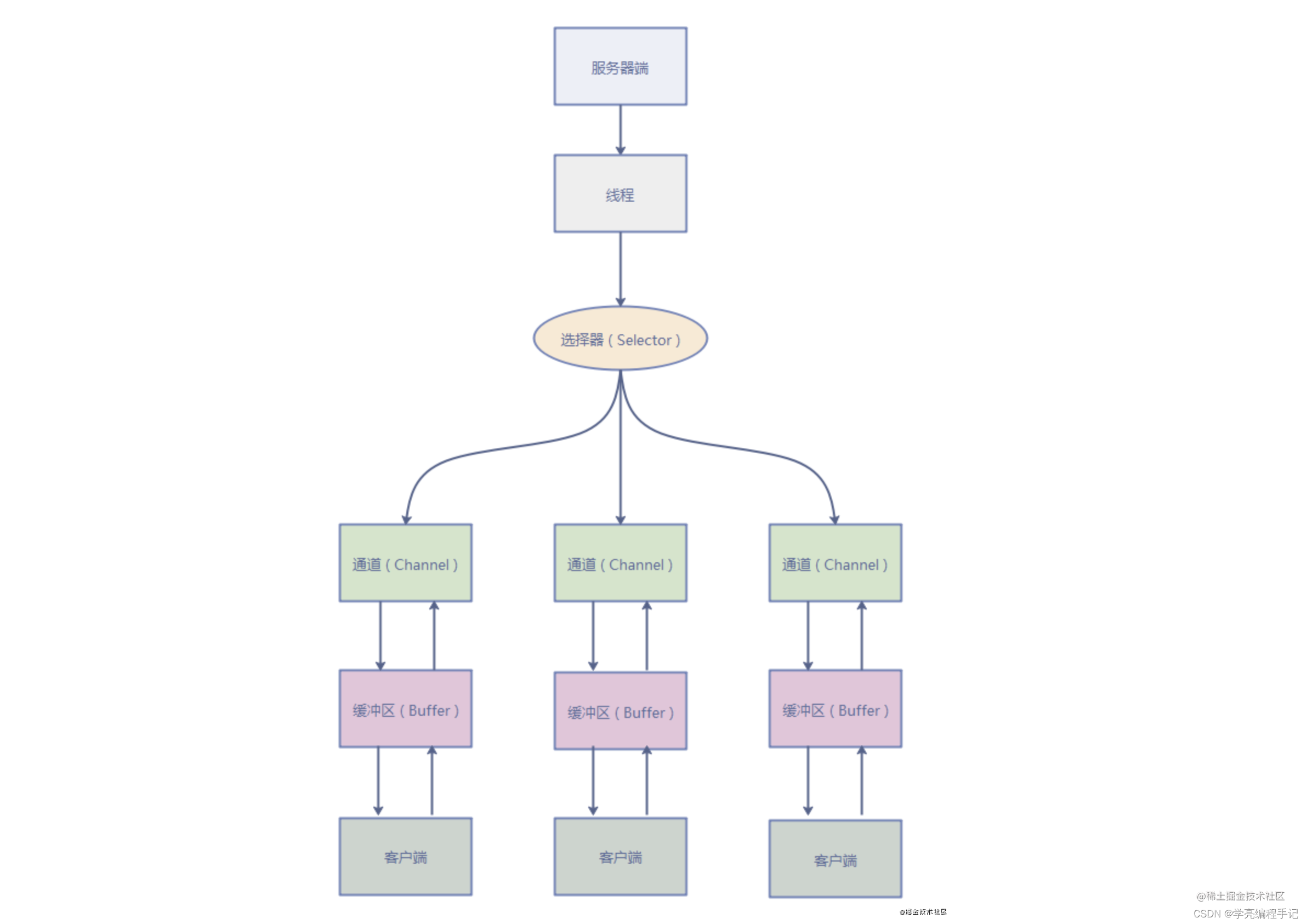
The NIO workflow can be summarized as follows:
- Register Channels with a Selector: register a Channel on a Selector and specify the events of interest, such as read-ready or write-ready.
- Let the Selector listen for events: the Selector continuously checks registered Channels for events.
- Handle ready events: when a Channel has an event of interest, the Selector notifies the corresponding thread or a thread from a pool to process it. The handler can read data from the Channel into a Buffer or write data from a Buffer to the Channel.
- Continue listening: after processing, the thread returns to the Selector and waits for more Channel events.
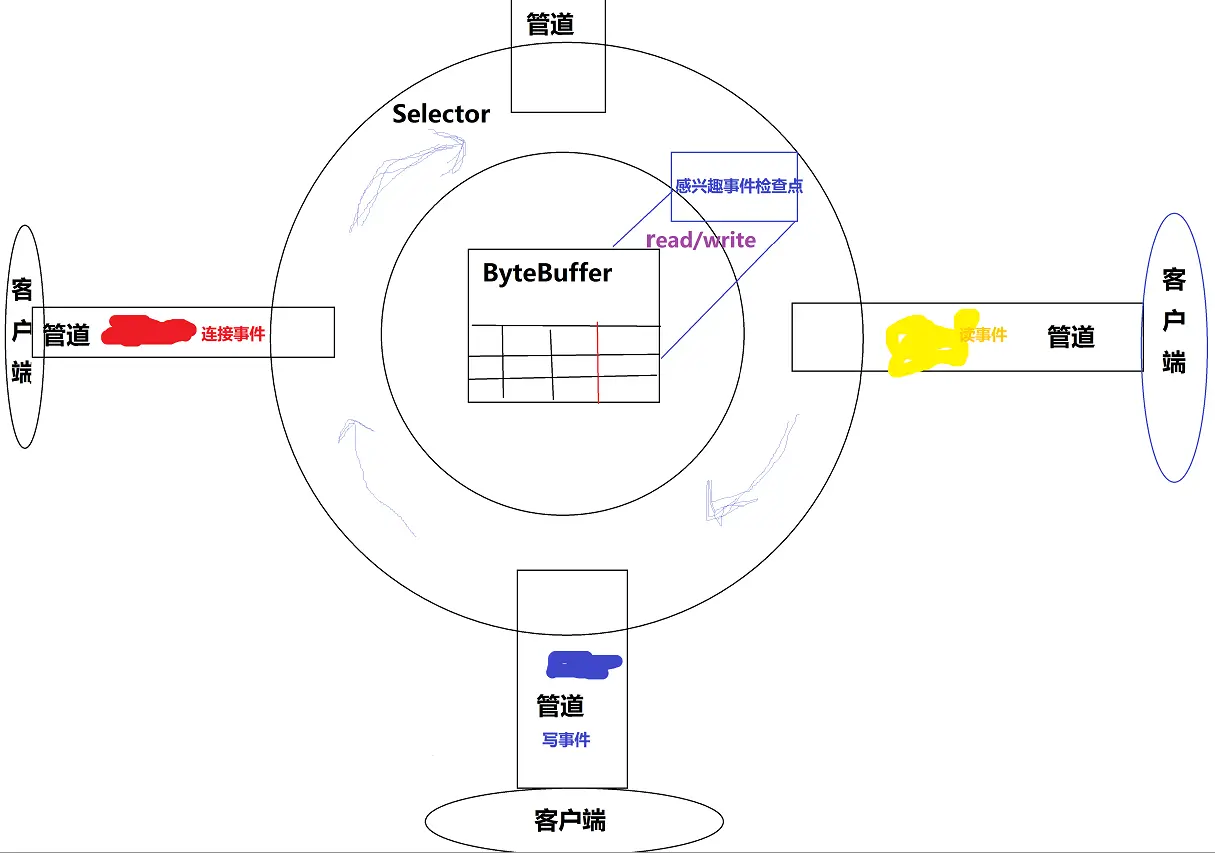
A typical NIO network program follows these steps:
- Create
ServerSocketChannelandSocketChannelobjects to listen for client connections and perform data reading and writing. - Create a
Selectorto listen for events onServerSocketChannelandSocketChannel. - Register
ServerSocketChannelwith the Selector and specify event types such as connection, read, or write events. - Create a
Bufferto store data for reading and writing. - Use the Selector's
select()method to wait for events. When events occur, callselectedKeys()to obtain the event list and iterate through it. - In the event handling logic, use Buffer objects for data reading and writing.
- Close related resources, including Channel, Buffer, and Selector objects.
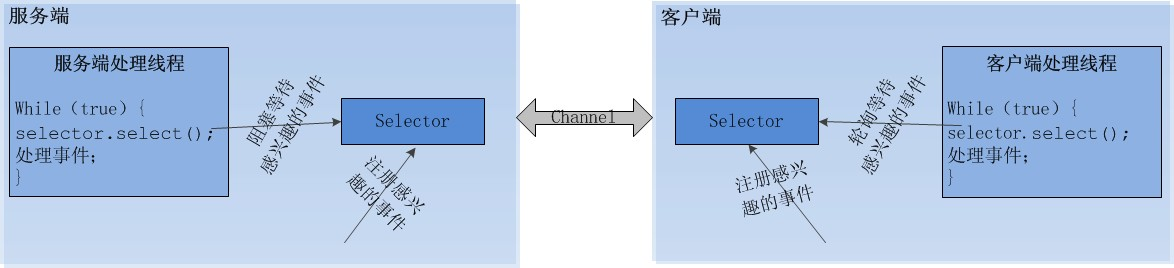
The Java NIO server can start one dedicated thread to handle all I/O events. It does this by using bidirectional Channels instead of one-way Streams, and by registering events of interest on those Channels.
There are four common event types:
<table> <thead> <tr> <th>Event</th> <th>Value</th> </tr> </thead> <tbody> <tr> <td>Server accepts a client connection</td> <td>SelectionKey.OP_ACCEPT(16)</td>
</tr>
<tr>
<td>Client connects to server</td>
<td>SelectionKey.OP_CONNECT(8)</td>
</tr>
<tr>
<td>Read event</td>
<td>SelectionKey.OP_READ(1)</td>
</tr>
<tr>
<td>Write event</td>
<td>SelectionKey.OP_WRITE(4)</td>
</tr>
</tbody>
</table>
NIO's asynchronous characteristics mainly appear in these areas:
- Non-blocking I/O: through Selector and Channel, threads do not need to be suspended while waiting for I/O readiness.
- Event-driven processing: business logic is triggered only when an event of interest occurs.
- High performance: non-blocking and event-driven design improves concurrency and throughput.
NIO has clear advantages: when an I/O system call is initiated, it can return immediately while the kernel is still waiting for data. The user thread is not blocked during the waiting phase, so responsiveness is better.
Its drawback is also clear: repeated I/O system calls and polling can continuously ask the kernel whether data is ready. This may consume a large amount of CPU time and reduce resource utilization.
Strictly speaking, Java NIO is not exactly the same thing as the NIO model in operating-system I/O model classifications. In practice, Java NIO is better understood as an I/O multiplexing model.
NIO is especially suitable for systems that need to handle many concurrent connections and I/O operations, such as large application servers, network chat rooms, and real-time game servers. In these scenarios, NIO can reduce thread resource consumption and improve system stability and scalability.
Channel
A Channel plays a role similar to a Stream in old I/O, but it is not the same thing.
In traditional OIO, a network connection is usually associated with two streams: an input stream and an output stream. Java applications continuously perform input and output through these two streams.
In NIO, a network connection is represented by a Channel. All NIO I/O operations are performed through the Channel. A Channel can be seen as a combination of the two old stream directions: data can be read from it and written to it.
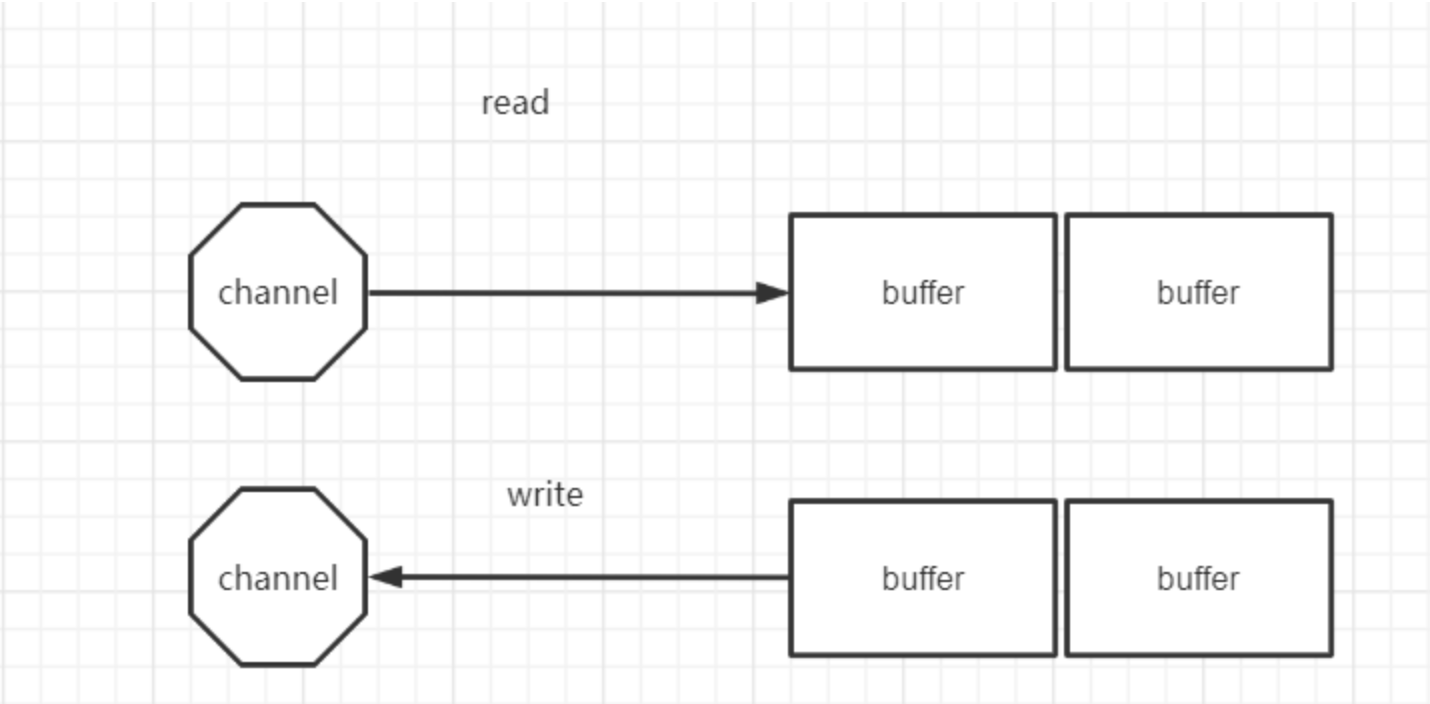
The most obvious difference is direction:
- Stream is one-way.
InputStreamis read-only, andOutputStreamis write-only. - Channel is bidirectional. It can be used for both read and write operations.
The main Channel implementations in NIO include:
FileChannel: used for file I/O.DatagramChannel: used for UDP I/O.SocketChannel: used for TCP data transfer.ServerSocketChannel: used for listening to TCP connections.
Compared with the old java.io library, Java NIO was not designed simply as a replacement. It introduced three important design ideas:
- Encapsulation of read and write buffers for primitive types.
- A channel-based read/write mechanism that further abstracts Stream.
- Event polling and the Reactor-style design pattern, namely the Selector mechanism.
A Stream has a direction, while a Channel only represents a passage. Its name emphasizes the generality of the input and output object in NIO and provides the foundation for non-blocking I/O.
There are also read-only and write-only Channels in implementation, but these are abstractions of read and write behavior. If NIO is used in blocking mode, it behaves similarly to traditional java.io, except that an additional buffering layer exists. Still, the essence of NIO is to give programmers more control over non-blocking input and output.
So from a design perspective, java.nio is not a full replacement for java.io. It gives developers more choices and more control.
Scatter and gather
Java NIO supports scatter/gather operations. These describe reading from or writing to a Channel using multiple Buffers.
ReadableByteChannel and WritableByteChannel provide basic channel read and write capabilities. ScatteringByteChannel and GatheringByteChannel add methods that accept arrays of buffers.
Scatter/gather is often used when transferred data must be separated for processing. For example, a message may contain a header and a body. The header and body can be placed into different Buffers, making each part easier to handle.
Scatter means that a read operation writes data into multiple Buffers. Data read from a Channel is scattered into several Buffers.
The Buffer array is passed to channel.read(). The read() method writes data into the Buffers in array order. When one Buffer is full, it continues writing into the next Buffer.
Scattering Reads must fill the current Buffer before moving to the next one. This means it is not suitable for dynamic messages whose sizes are not fixed. If there is a header and body, the header must be completely filled, for example 128 bytes, before Scattering Reads can work properly.
Gather means that a write operation writes data from multiple Buffers into one Channel. Data from several Buffers is gathered and sent through the Channel.
The Buffer array is passed to write(). The write() method writes data into the Channel according to the order of the Buffers in the array. Only data between position and limit is written. If a Buffer has a capacity of 128 bytes but contains only 58 bytes of data, only those 58 bytes are written to the Channel. Unlike Scattering Reads, Gathering Writes can handle dynamic messages better.
Buffer
Applications interact with Channels mainly through read and write operations. To make non-blocking read and write possible, NIO introduces another essential component: the Buffer.
A Buffer is essentially a container, usually backed by a continuous array. A Channel provides the path for reading from files or networks, but all data must pass through a Buffer.
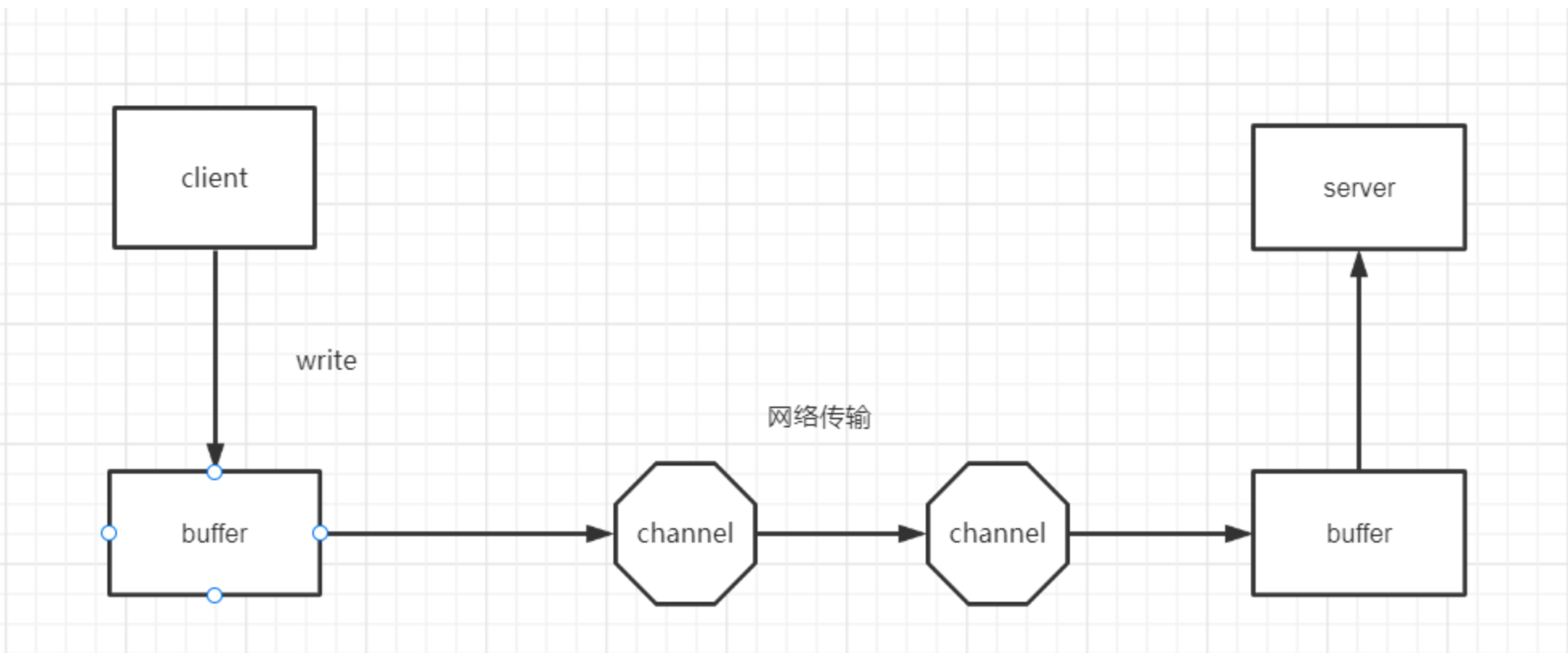
Reading from a Channel means reading data from the Channel into a Buffer. Writing to a Channel means writing data from a Buffer into the Channel. This Buffer-based interaction does not exist in the same form in stream-oriented OIO, and it is one of the foundations of NIO's non-blocking design.
A Buffer is essentially a memory block implemented around an array. Buffer is an abstract class. For the seven primitive types except boolean, Java provides corresponding Buffer subclasses. The most commonly used one is ByteBuffer, because network data is transmitted in bytes.
A Buffer can be both read and written, but its mode must be switched explicitly. If a Buffer is currently in write mode, it must be switched to read mode before data can be read. The reverse also applies.
There are two basic modes:
- Write mode: data is written into the blank area of the Buffer. The cursor moves through the available space, and the boundary is the Buffer capacity.
- Read mode: data is read from the filled area. The cursor moves through the written data, and the boundary is the amount of data already written.
When data is written into a Buffer, the Buffer records how much has been written. Before reading that data, flip() is used to switch the Buffer from write mode to read mode. In read mode, the previously written data can be read.
After all data has been read, the Buffer must be cleared so it can be written again. There are two ways to do this:
clear()clears the entire Buffer from the perspective of its indexes.compact()clears only the data that has already been read. Unread data is moved to the beginning of the Buffer, and newly written data will be placed after it.
It is worth noting that clear() can be misleading by name. It does not really wipe the underlying data from memory. It only resets index values inside the Buffer object. If the previous read filled the Buffer and the next read does not fill it completely, old data may still physically remain in the memory area. This is why code should use hasRemaining() to judge whether there is usable data. The method compares position and limit; old data outside the current limit is isolated and does not affect current processing.
In Java NIO, Buffer is the only way to move data into and out of Channels. It wraps a memory area that can be written to and later read from, and provides methods to access that memory conveniently.
Java NIO provides these Buffer classes for data types that can be transferred through I/O:
ByteBufferCharBufferDoubleBufferFloatBufferIntBufferLongBufferShortBufferMappedByteBuffer
The first seven correspond to Java primitive data types that can be used in I/O. MappedByteBuffer is a special ByteBuffer type used for memory-mapped files. In actual network programming, ByteBuffer is used most often.
Selector
A Java NIO Selector allows a single thread to monitor multiple input Channels. Multiple Channels can share one Selector. The thread then selects Channels that already have processable input or are ready for writing. This selection mechanism makes it straightforward for one thread to manage many Channels.
The Selector's job is I/O multiplexing. It registers Channels, monitors them, and queries their events. A Channel represents a connection path. A Selector can monitor the I/O readiness of many Channels at the same time. Their relationship is simply monitoring and being monitored.
The Selector provides API methods that can select ready I/O events on monitored Channels, such as read-ready and write-ready events.
In NIO programming, one thread usually handles one Selector, and one Selector can monitor many Channels. With this mechanism, a single thread can manage hundreds, thousands, tens of thousands, or even more Channels. In extreme cases, tens of thousands of connections can be handled with one thread, significantly reducing the cost of context switching between threads.
To use a Selector, a Channel must first be registered with it. Then the program calls select(). This method blocks until at least one registered Channel has a ready event. When it returns, the thread can handle events such as a new connection or incoming data.
A Channel is registered with a Selector by calling Channel.register(Selector sel, int ops). The first parameter specifies the Selector instance. The second specifies the I/O event types that the Selector should monitor.
The four selectable event types are:
- Readable:
SelectionKey.OP_READ - Writable:
SelectionKey.OP_WRITE - Client connects to server:
SelectionKey.OP_CONNECT - Server accepts client connection:
SelectionKey.OP_ACCEPT
These constants are defined in SelectionKey. If multiple events must be monitored, the bitwise OR operator can combine them, for example read and write events together.
When used with a Selector, a Channel must be in non-blocking mode. This means FileChannel cannot be used with a Selector, because FileChannel cannot be switched to non-blocking mode. Socket-related Channels can.
A program can also attach an object or extra information to a SelectionKey. This makes it easier to identify a specific Channel, such as by attaching a Buffer used with that Channel or an object containing aggregated data.
SelectionKey provides methods corresponding to the four event types:
selectionKey.isAcceptable();selectionKey.isConnectable();selectionKey.isReadable();selectionKey.isWritable();
What exactly is an I/O event?
This concept is easy to confuse. In this context, an I/O event does not mean the actual I/O operation on the Channel. It means the Channel is in a ready state for an I/O operation.
For example:
- If a
SocketChannelcompletes the TCP three-way handshake with the peer, a connection-ready event,OP_CONNECT, occurs. - If a
ServerSocketChanneldetects a new incoming connection, an accept-ready event,OP_ACCEPT, occurs. - If a
SocketChannelhas data available for reading, a read-ready event,OP_READ, occurs. - If a
SocketChannelis ready to write data, a write-ready event,OP_WRITE, occurs.
The core principle behind socket connection events is related to the TCP connection establishment process, including the three-way handshake and four-way termination.
SelectableChannel
Not every Channel can be monitored or selected by a Selector.
For example, FileChannel cannot be multiplexed by a Selector. The key condition is whether the Channel extends the abstract class SelectableChannel. If it does, it can be selected. If not, it cannot.
SelectableChannel provides common methods required for selectable Channels. In Java NIO, all network socket Channels inherit from SelectableChannel, so they are selectable. FileChannel does not inherit from it and therefore is not selectable.
SelectionKey
After a Channel is successfully registered with a Selector, ready events can be selected. This work is done by calling the Selector's select() method. The method continuously selects readiness states of registered Channels and returns the I/O events that the application is interested in.
When a registered I/O event becomes ready on a Channel, the Selector selects it and places it into a collection of SelectionKey objects.
A SelectionKey can be understood as a selected I/O event. If an I/O event occurs and was previously registered, it will be selected. If it was not registered, it will not be selected even if it occurs.
In real programming, SelectionKey is powerful. It can provide:
- the event type, such as
SelectionKey.OP_READ; - the Channel where the event occurred;
- the Selector instance that selected it.
Basic Selector workflow
Using a Selector usually involves three steps:
- Obtain a Selector instance.
- Register Channels with the Selector.
- Poll for I/O readiness events and process the selected key set.
1. Obtain a Selector
A Selector instance is obtained through the static factory method open().
Internally, Selector.open() asks the Selector SPI, SelectorProvider, for a new Selector instance. SPI stands for Service Provider Interface. It is a JDK mechanism for service extension and discovery. Java provides the default Selector implementation through SPI, and other providers can theoretically offer customized implementations or extensions through the same mechanism.
2. Register a Channel
To let the Selector manage a Channel, the Channel must be registered with the Selector. Before registration, the Channel must already be prepared.
A critical rule is that the Channel registered with a Selector must be in non-blocking mode. Otherwise, IllegalBlockingModeException is thrown.
This also explains why FileChannel cannot be used with a Selector: it only supports blocking mode and cannot switch to non-blocking mode. Socket-related Channels can.
Another point is that a Channel does not necessarily support all four event types. For example, ServerSocketChannel only supports the Accept event for new connections. SocketChannel, used for data transfer, does not support Accept events.
Before registration, validOps() can be used to obtain the set of I/O events supported by a Channel.
3. Select ready events
The Selector's select() method selects registered I/O events that are already ready and stores them in the selected key set.
This set is maintained inside the Selector instance. Calling selectedKeys() returns the set of SelectionKey instances.
The program then iterates over the selected keys and executes the corresponding business logic based on the event type. After processing a key, it must be removed from the selected key set to prevent it from being processed again in the next loop.
The selected key set does not support adding elements manually. Attempting to add a SelectionKey to it throws java.lang.UnsupportedOperationException.
The select() method has several overloads:
select(): a blocking call that waits until at least one Channel has a registered I/O event ready.select(long timeout): similar toselect(), but blocks for at most the specified number of milliseconds.selectNow(): non-blocking; returns immediately whether or not any I/O event is ready.
The return value of select() is an int, representing the number of I/O events that occurred. More precisely, it is the number of Channels that had events occur between the previous selection and the current one, limited to the events that the Selector is interested in.