What I Bought During 2023 Double 11: PC Upgrades, Kids’ Essentials, and Home Purchases
Double 11 is over for another year, and after more than ten days of comparing options and watching prices, I still ended up placing quite a few orders.
A small laptop upgrade: 16GB DDR5 memory and a 2TB PCIe 4.0 SSD
Not long ago I switched to a new laptop, the Colorful Jiangxing X15-AT23, so I had already planned to use the shopping event to give it a modest upgrade. It originally came with a single 16GB Crucial DDR5-4800 memory module and a 512GB PCIe 3.0 SSD.
For memory, I bought another 16GB Crucial DDR5-4800 stick for ¥269 so the machine could run in dual-channel with 32GB total. For storage, I went with the Aigo P7000Z 2TB PCIe 4.0 SSD for ¥559. Its advertised maximum read/write speed goes up to 7450MB/s. The price was noticeably higher than during the 618 sale — I remember it dropping as low as ¥449 back then. I had been watching it for a while and kept seeing ¥599, so in the end I used two coupons and bought it for ¥559.
Installation was fairly straightforward. I removed the back cover, disconnected the battery, and pressed the power button a few times to discharge any residual electricity. Then I installed the memory and SSD one at a time so I could confirm each upgrade was working properly.
The memory went in first. The first boot was a little slower than usual, but everything was normal after that and the system correctly showed 32GB of RAM.
After that, I installed the new SSD. Since the new drive has better performance, I wanted the system to run from it instead of the old one. I also wanted to restore the original licensed operating system, so I downloaded Windows 11 Home Chinese edition in advance and used Ventoy for installation. The whole process went smoothly, and once the laptop connected to the internet, the system activated automatically.
I compared CrystalDiskMark results before and after the upgrade, and the improvement was pretty obvious. The P7000Z delivered read and write speeds above 6500MB/s.
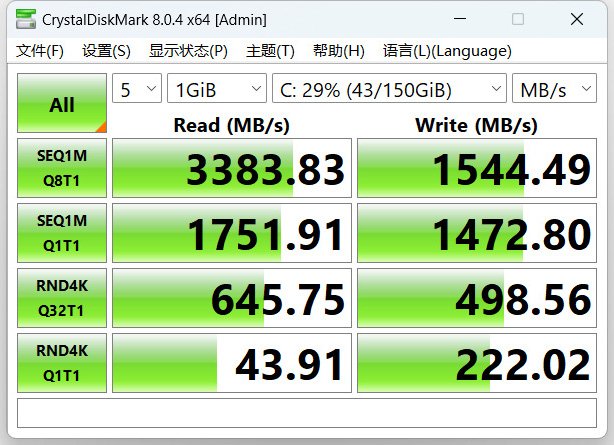
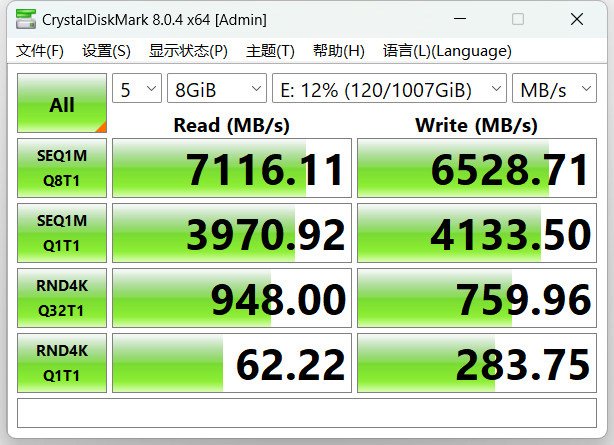
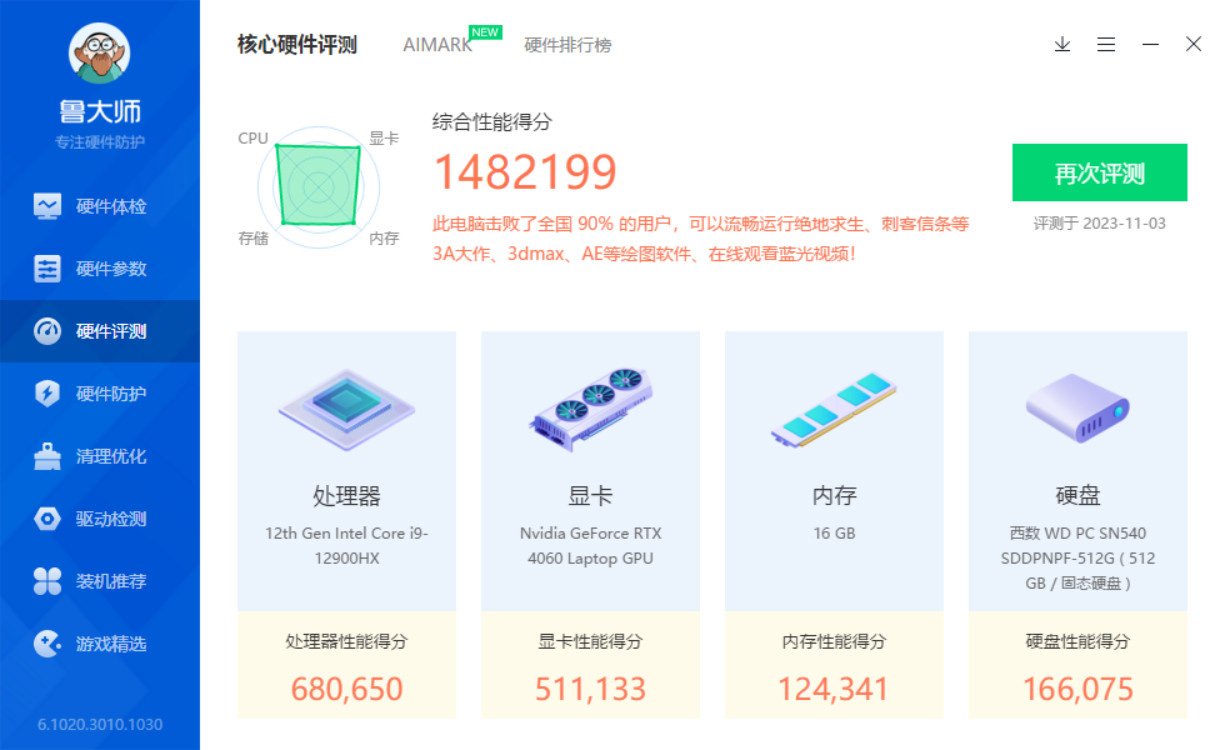
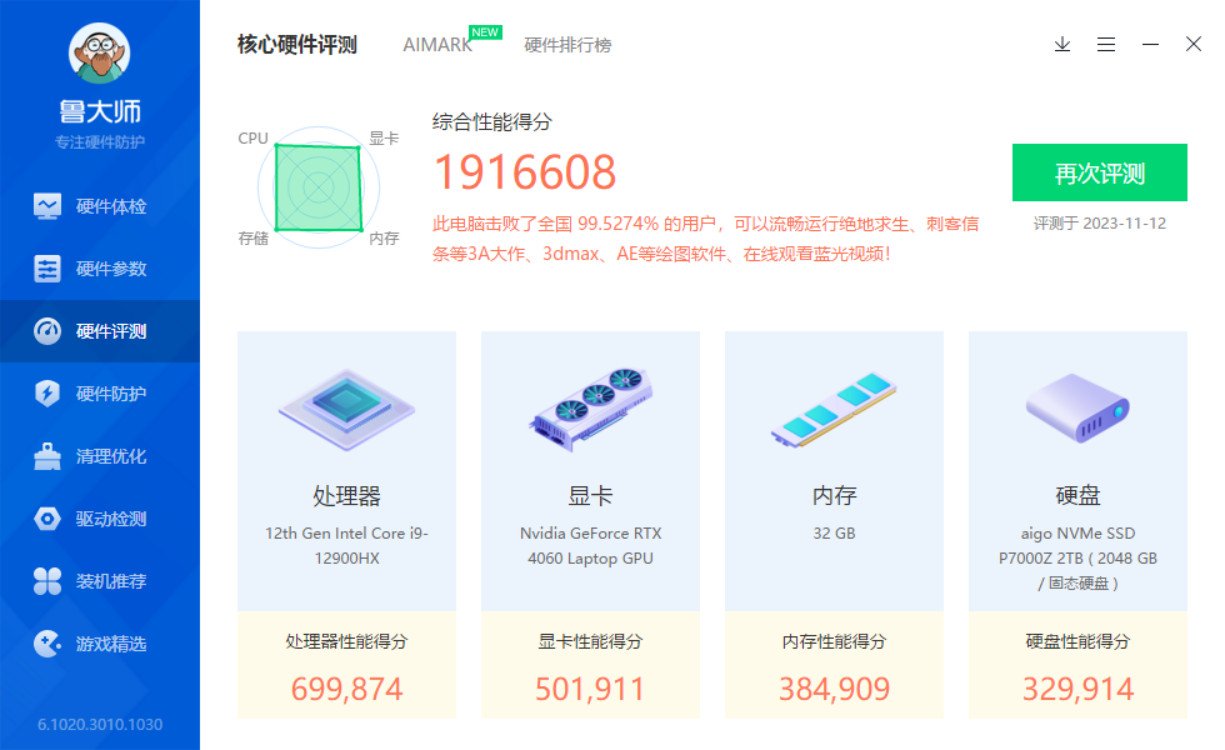
There was also a clear jump in the overall benchmarking score before and after the upgrade, especially from the memory and storage side.
A Thunderbolt 4 dock that solved the port shortage
The laptop only has two USB ports. One is occupied by the wireless mouse receiver, and the other by an external keyboard, so even plugging in a flash drive is inconvenient. Since the laptop includes a Thunderbolt 4 port, adding a dock made a lot of sense.
I bought the 5-in-1 Baseus Thunderbolt 4 dock for ¥39. In actual use, though, I ran into one issue: the laptop’s built-in HDMI port connected to a monitor without any problem, but the HDMI port on the dock showed no response at all. At first I thought the dock was defective. After searching online, I found that external display output over Thunderbolt seemed to require hybrid graphics mode.
On this Colorful laptop, that setting can be changed inside the preinstalled Control Center software. In the GPU Switch menu, I changed it to MSHybrid, restarted the laptop, and then the monitor worked through the Thunderbolt connection. The dock’s one-click screen-off function is also surprisingly useful.
A study chair and a learning tablet for my son
One of the bigger purchases this time was for the kids. My son had been using my office chair, but he never sat very steadily in it. He would keep spinning around, and his sitting posture was not great either. So I picked a simple adjustable study chair for children, one that makes height adjustment easy and feels much more stable when sitting.
He already takes Zebra classes, and before this he had been using an iPad. The problem was that an iPad also makes it too easy to watch videos or play games, which is hard to control. So my wife chose a Homework Help T20 Pro+ learning tablet, along with an electronic dictionary pen, for ¥2899.
So far the device has been working pretty well. It includes teaching materials for multiple grade levels and different regions, so he can preview and review textbook content directly on it. There are also explanations of key knowledge points. It can scan worksheets by taking photos and check how accurate the answers are, though naturally it cannot recognize everything perfectly. When it identifies a wrong answer, it can also provide similar practice questions.
There are some useful supervision features too. If the child sits too close to the screen or uses it in dim light, it gives reminders. Installing apps requires authorization from a parent’s phone, and specific apps can be restricted. The built-in question bank is extensive, and many topics also come with video explanations.
It is not limited to textbook study either. There are tutorials for drawing, Rubik’s Cube solving, origami, and other activities, which my son enjoys. Hopefully it will be genuinely helpful for his learning rather than just becoming another screen.
The things my daughter goes through every day: formula and pull-up diapers
Two of the most necessary purchases were for my daughter: Aptamil Stage 3 Platinum formula, Australian version, 6 cans for ¥1080, and Pampers pull-up diapers, 6 boxes for ¥738.
She still drinks formula twice a day — once after waking up in the morning and again after her nap. She has just turned two, and we have already started guiding her to use her own little potty, gradually working toward getting rid of diapers.
A blender for easier breakfasts
For the kitchen, I bought the Joyoung L15-P919 blender for ¥349.
We had owned a few soy milk makers before, but they were troublesome to use, noisy, and the texture was never smooth enough. Most of them ended up sitting unused. My wife compared several models before finally choosing this one.
After using it, the difference is pretty clear. It really is not very loud, and it has a timer function as well. Ingredients can be prepared the night before, and by the time we get up in the morning, everything is already blended. The result is rich and smooth. My wife has already started trying different recipes, so breakfast should become more varied from now on.
Clothing, shoes, and household stock-up
Beyond the larger purchases, there were also plenty of everyday items. The kids have grown taller, so clothes and shoes needed updating too. We also stocked up on rice, flour, cooking oil, seasonings, laundry detergent, fabric softener, toothpaste, and other household basics. These get used up quickly, so keeping some on hand is still very practical.
Double 11 promotions always come with plenty of tricks and complicated pricing, but compared with regular prices there were still some worthwhile discounts. I started buying gradually from the JD event kickoff on October 23, picking up a little each day. At this point, I do not think it is necessary to wait until the final few days of the event. Sometimes the earlier offers are actually better than the supposed last-minute deals.