How to Manage Software with YUM on Linux and Compile Packages from Source
RPM is a common way to manage software on Linux, but it has one major limitation: it does not handle dependencies automatically. YUM is designed to solve that problem by managing RPM packages through repositories and resolving required dependencies during installation.
Using YUM to manage RPM packages offers a clear advantage:
- it can automatically resolve package dependencies
Before using YUM, a repository must be configured.
Types of YUM repositories
Common YUM source types include:
- local YUM repositories
- FTP repositories
- HTTP repositories
Some commonly used mirror locations are:
- Aliyun mirror:
https://mirrors.aliyun.com - NetEase mirror:
http://mirrors.163.com/ - EPEL / CentOS archive:
http://vault.centos.org
To install the EPEL repository:
yum install epel-release
Where YUM repository files are stored
YUM repository configuration files are located in:
/etc/yum.repos.d/*.repo
Example: configuring a local YUM repository
A local repository can be built from installation media mounted on the system.
[root@wei yum.repos.d]# mount /dev/sr0 /mnt/
mount: /dev/sr0 写保护,将以只读方式挂载
[root@wei yum.repos.d]# ls /mnt/
CentOS_BuildTag  EULA  images  LiveOS    repodata              RPM-GPG-KEY-CentOS-Testing-7
EFI              GPL   isolinux  Packages  RPM-GPG-KEY-CentOS-7  TRANS.TBL
[root@wei yum.repos.d]# mkdir /etc/yum.repos.d/beifeng
[root@wei yum.repos.d]# mv /etc/yum.repos.d/CentOS-* /etc/yum.repos.d/beifeng/
[root@wei yum.repos.d]# ls beifeng
mysql-community.repo  mysql-community-source.repo
[root@wei yum.repos.d]# vim centos.repo
[root@wei yum.repos.d]# ls
beifeng  centos.repo  mysql-community.repo  mysql-community-source.repo
配置内容:
[centos7.2]
name=centos7.2
baseurl=file:///mnt
enable=1
gpgcheck=0
After updating repository settings, clear the existing YUM cache:
[root@wei yum.repos.d]# yum clean all
Then rebuild the cache:
[root@wei yum.repos.d]# yum makecache
To confirm that the repository is available:
[root@wei yum.repos.d]# yum repolist
Common YUM operations
Install software
# yum install 软件名
# yum install -y 软件名
Show all packages available through YUM
[root@wei ~]# yum list all
Show all package groups
[root@wei ~]# yum grouplist
Install a package group
# yum groupinstall -y 软件组的名称
If the group name is in English, wrap it in quotation marks.
Find which package provides a file
# yum provides “*bin/passwd”
Installing software from source code
Besides using YUM, software can also be installed by compiling from source. The basic process is:
- configure installation parameters
- compile
- install
A GCC build environment is required first:
yum install gcc
Example: compiling and installing htop
Source package:
https://www.lanzous.com/i2zs97g
Extract the archive:
[root@wei ~]# tar zxf htop-1.0.2.tar.gz
Enter the source directory:
[root@wei ~]#cd htop-1.0.2
View available configure options:
[root@wei htop-1.0.2]# ./configure --help |less
Run configuration with an installation prefix:
[root@wei htop-1.0.2]# ./configure --prefix=/usr/local/htop
Compile:
[root@wei htop-1.0.2]# make
Install:
[root@wei htop-1.0.2]# make install
Start the program after installation:
[root@wei share]# /usr/local/htop/bin/htop
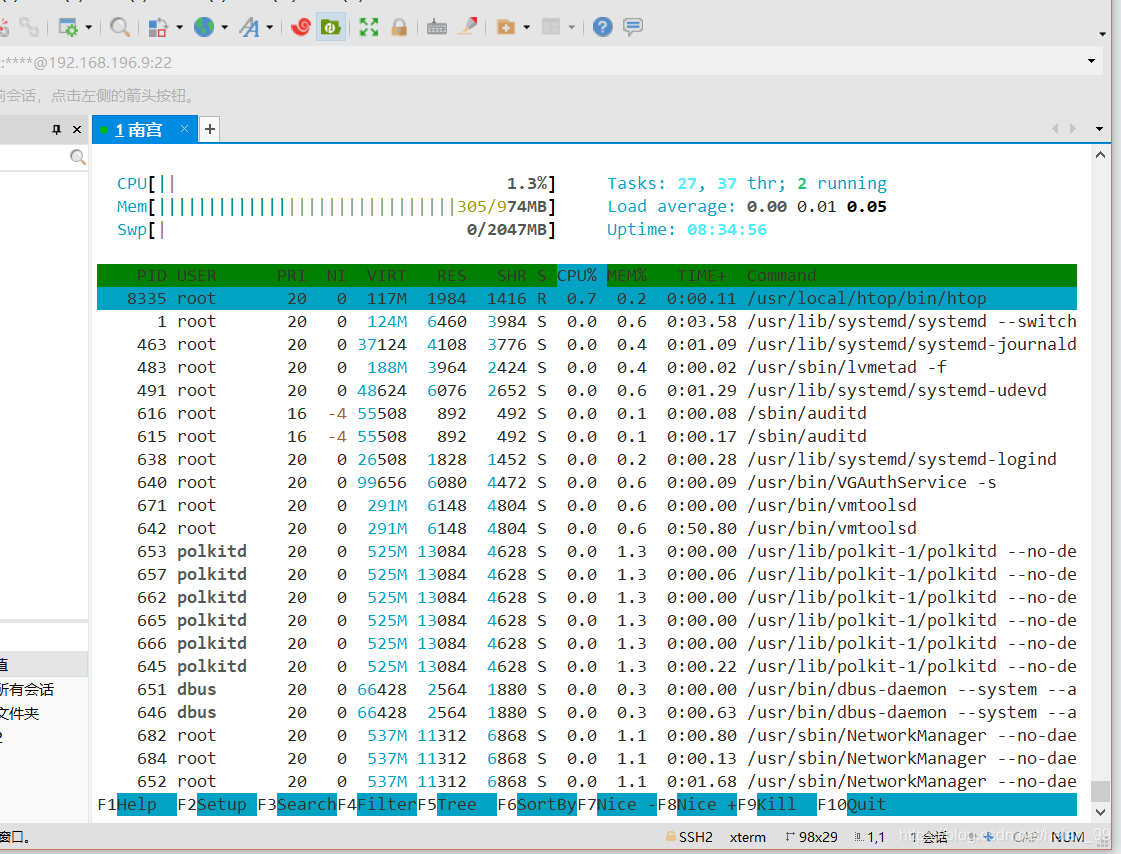
If the following error appears during configuration:
configure: error: You may want to use --disable-unicode or install libncursesw.
Install the required dependency with YUM:
[root@wei htop-1.0.2]# yum install -y ncurses-devel
This shows the practical difference between package management and source installation: YUM is convenient because it handles dependencies automatically, while compiling from source often requires you to resolve missing development libraries yourself.