Build a Gin Email Alert API with Config Files, Modular Structure, and Rotating Logs
The earlier versions of this mail alert service already handled the basics: sending mail through Gin, supporting multiple recipients, and adding logging. The main problem was maintainability. Everything lived in a single main file, and the mail settings were hard-coded directly in the program, which made later changes inconvenient.
This version improves that foundation in two practical ways:
- add configuration file management
- split the project into separate modules
In many day-to-day operating system environments, alerting by email often ends up relying on tools like mailx. That means each machine needs its own account, password, and mail authentication settings. If several machines need to send alerts, configuration has to be repeated again and again, which is tedious and increases the risk of password exposure.
A cleaner approach is to provide a mail-sending API instead:
- build an HTTP interface
- accept POSTed JSON data
- convert the JSON data into the required message format
- send the email
Project layout
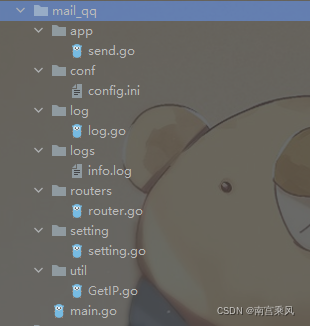
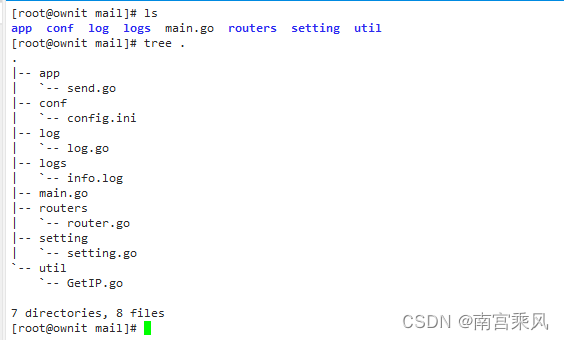
The service is separated into clear components:
main.gostarts the applicationconf/config.inistores runtime settingssetting/setting.goreads configuration valuesrouters/router.goregisters routesapp/send.gohandles the email logicutil/GetIP.gogets the caller IPlog/log.goinitializes logging and log rotation
Entry point: main.go
The startup logic is straightforward: initialize the logger, read the service port from the configuration file, register routes, and run the Gin server.
package main

import (
    "code/mail_qq/log"
    "code/mail_qq/routers"
    "code/mail_qq/setting"
    "fmt"
)

/*
支持多人发送
curl http://10.10.10.3:7070/send -H "Content-Type:application/json" -X POST -d '{"source":"heian","contacts":["账号@mail_qq.com","账号@mail_qq.com"],"subject":"多人测试","content":"现在进行多人测试"}'
*/

/*
zapcore.Core需要三个配置——Encoder,WriteSyncer,LogLevel
Encoder:编码器(如何写入日志)。我们将使用开箱即用的NewJSONEncoder()
WriterSyncer :指定日志将写到哪里去。我们使用zapcore.AddSync()
Log Level:哪种级别的日志将被写入。
*/

//var sugarLogger *zap.SugaredLogger
func main() {
    log.InitLogger()
    defer log.SugarLogger.Sync()
    port := setting.GetPort()
    r := routers.SetupRouter()
    r.Run(":" + fmt.Sprint(port))
    log.SugarLogger.Infof("Success! Port is start")
    //r.Run(":8080")
}
This keeps the startup file focused only on bootstrapping, instead of mixing server setup with business logic and mail credentials.
Configuration file: conf/config.ini
Moving SMTP settings out of code makes the service far easier to maintain. Port, account, password, server address, and source authentication value are all defined in one place.
port = 8080
[mail]
user = 账号@qq.com
password = 密码
host = smtp.qq.com:25
source = heian
With this setup, changing the listening port or SMTP account no longer requires recompiling after editing hard-coded values in multiple places.
Getting the client IP: util/GetIP.go
A small utility function is used to capture the request IP, which is useful for logging who called the API.
package util

import "github.com/gin-gonic/gin"

//获取ip
func GetRequestIP(c *gin.Context) string {
    reqIP := c.ClientIP()
    if reqIP == "::1" {
        reqIP = "127.0.0.1"
    }
    return reqIP
}
It also normalizes the local IPv6 loopback ::1 to 127.0.0.1.
Reading settings: setting/setting.go
Configuration loading is centralized in the setting package. One function reads mail-related configuration, and another reads the service port.
package setting

import (
    "fmt"
    "os"

    "github.com/go-ini/ini"
)

func GetMail() (user, password, host, source string) {
    //读取.ini里面的数据库配置
    config, err := ini.Load("conf/config.ini")
    if err != nil { //失败
        fmt.Printf("Fail to read file: %v", err)
        os.Exit(1)
    }
    host = config.Section("mail").Key("host").String()
    //port = config.Section("mail").Key("port").String()
    user = config.Section("mail").Key("user").String()
    password = config.Section("mail").Key("password").String()
    source = config.Section("mail").Key("source").String()
    //fmt.Println(user, password, host, source)
    return
}

func GetPort() (prot string) {
    config, err := ini.Load("conf/config.ini")
    if err != nil { //失败
        fmt.Printf("Fail to read file: %v", err)
        os.Exit(1)
    }
    prot = config.Section("").Key("port").String()
    return
}
The main advantage here is separation of concerns: the rest of the program only asks for settings and does not need to know how they are stored.
Log management and rotation: log/log.go
This service uses zap for logging and lumberjack for rotating log files. That avoids endlessly growing log files and keeps operational records manageable.
package log

import (
    "github.com/natefinch/lumberjack"
    "go.uber.org/zap"
    "go.uber.org/zap/zapcore"
)

var SugarLogger *zap.SugaredLogger

func InitLogger() {
    writeSyncer := getLogWriter()
    encoder := getEncoder()
    core := zapcore.NewCore(encoder, writeSyncer, zapcore.DebugLevel)
    logger := zap.New(core, zap.AddCaller())
    SugarLogger = logger.Sugar()
}

func getEncoder() zapcore.Encoder {
    encoderConfig := zap.NewProductionEncoderConfig()
    encoderConfig.EncodeTime = zapcore.ISO8601TimeEncoder
    encoderConfig.EncodeLevel = zapcore.CapitalLevelEncoder
    return zapcore.NewConsoleEncoder(encoderConfig)
}

func getLogWriter() zapcore.WriteSyncer {
    /*
    Lumberjack Logger采用以下属性作为输入:
    Filename: 日志文件的位置
    MaxSize:在进行切割之前,日志文件的最大大小(以MB为单位)
    MaxBackups:保留旧文件的最大个数
    MaxAges:保留旧文件的最大天数
    Compress:是否压缩/归档旧文件
    */
    lumberJackLogger := &lumberjack.Logger{
        Filename:   "./logs/info.log",
        MaxSize:    10,
        MaxBackups: 5,
        MaxAge:     30,
        Compress:   false,
    }
    return zapcore.AddSync(lumberJackLogger)
}
A few points stand out:
- log output is initialized once at startup
- the encoder uses ISO8601 timestamps and uppercase log levels
- logs are written to
./logs/info.log - a single file is limited to 10 MB
- up to 5 backups are kept
- old logs are retained for 30 days
- compression is disabled
For an alerting service, logging matters because each API call, request IP, recipient list, and send result can be traced later.
Route registration: routers/router.go
Routing is also separated from the main application logic. The service creates a versioned group and exposes the mail endpoint there.
package routers

import (
    "code/mail_qq/app"
    "github.com/gin-gonic/gin"
)

func SetupRouter() *gin.Engine {
    r := gin.Default()
    //v1
    v1Group := r.Group("v1")
    {
        //待办事项
        //添加
        v1Group.POST("/send", app.PostMail)
    }
    return r
}
The final path is /v1/send, which leaves room for future versions without changing the entire structure.
Sending mail: app/send.go
The actual business logic lives in the app package. This is where request validation, source checking, recipient handling, message generation, and SMTP sending are performed.
package app

import (
    "code/mail_qq/log"
    "code/mail_qq/setting"
    "code/mail_qq/util"
    "fmt"
    "net/http"
    "net/smtp"
    "strings"

    "github.com/gin-gonic/gin"
)

//var sugarLogger *zap.SugaredLogger

// 定义接收数据的结构体

type User struct {
    // binding:"required"修饰的字段,若接收为空值,则报错,是必须字段
    Source   string   `form:"source" json:"source" uri:"source" xml:"source" binding:"required"`
    Contacts []string `form:"contacts" json:"contacts" uri:"contacts" xml:"contacts" binding:"required"`
    Subject  string   `form:"subject" json:"subject" uri:"subject" xml:"subject" binding:"required"`
    Content  string   `form:"content" json:"content" uri:"content" xml:"content" binding:"required"`
}

func SendToMail(user, sendUserName, password, host, to, subject, body, mailtype string) error {
    hp := strings.Split(host, ":")
    //fmt.Println(hp)
    auth := smtp.PlainAuth("", user, password, hp[0])
    var content_type string
    if mailtype == "html" {
        content_type = "Content-Type: text/" + mailtype + "; charset=UTF-8"
    } else {
        content_type = "Content-Type: text/plain" + "; charset=UTF-8"
    }
    msg := []byte("To: " + to + "\r\nFrom: " + sendUserName + "<" + user + ">" + "\r\nSubject: " + subject + "\r\n" + content_type + "\r\n\r\n" + body)
    send_to := strings.Split(to, ";")
    err := smtp.SendMail(host, auth, user, send_to, msg)
    //fmt.Println(err)
    return err
}

func PostMail(c *gin.Context) {
    c_ip := util.GetRequestIP(c)
    fmt.Println(c_ip)
    log.SugarLogger.Debugf("调用 PostMail 接口Api,调用者IP: %s ", c_ip)
    声明接收的变量
    var json User
    将request的body中的数据,自动按照json格式解析到结构体
    // if err := c.ShouldBindJSON(&json); err != nil {
    //  // 返回错误信息
    //  // gin.H封装了生成json数据的工具
        c.JSON(http.StatusBadRequest, gin.H{"error": err.Error()})
        log.SugarLogger.Errorf("Error: %s", err.Error())
        return
    }
    //fmt.Println(json.Content, json.Contacts)
    //c.JSON(http.StatusOK, gin.H{"status": &json})
    //sugarLogger.Infof("info: %s", json)
    sources := json.Source
    user, password, host, source := setting.GetMail()
    if sources != source {
        fmt.Println("Send mail error!,source 认证失败")
        log.SugarLogger.Errorf("Send mail error!,source 认证失败")
        c.JSON(http.StatusOK, gin.H{
            "error": "Send mail error!,source 认证失败",
        })
        return
    }
    //println(json.Contacts)
    to := json.Contacts
    if to[0] == "" {
        fmt.Println("Send mail error!,发送人为空")
        log.SugarLogger.Errorf("Send mail error!,发送人为空")
        c.JSON(http.StatusOK, gin.H{
            "error": "Send mail error!,发送人为空",
        })
        return
    }
    subject := json.Subject
    if strings.TrimSpace(subject) == "" {
        fmt.Println("Send mail error!标题为空")
        log.SugarLogger.Errorf("Send mail error!标题为空")
        c.JSON(http.StatusOK, gin.H{
            "error": "Send mail error!,标题为空",
        })
        return
    }
    body := `
    <!DOCTYPE html>
    <html lang="en">
    <head>
    <meta charset="iso-8859-15">
    <title>MMOGA POWER</title>
    </head>
    <body>
    ` + fmt.Sprintf(json.Content) + `</body>
    </html>`
    sendUserName := "告警平台" //发送邮件的人名称
    fmt.Println("send email")
    for _, s := range to {
        //fmt.Println(i, s)
        err := SendToMail(user, sendUserName, password, host, s, subject, body, "html")
        //log.Printf("接收人:", s+"\n"+"标题:", json.Subject+"\n", "发送内容:", json.Content+"\n")
        fmt.Printf("接收人:%s \n 标题: %s \n 内容: %s \n", s, json.Subject, json.Content)
        log.SugarLogger.Infof("接收人: %s ,标题: %s, 内容: %s", s, json.Subject, json.Content)
        fmt.Println(err)
        if err != nil {
            fmt.Println("Send mail error!\n")
            log.SugarLogger.Errorf("Error 调用者IP: %s ,Send mail error! !", c_ip)
            c.JSON(http.StatusOK, gin.H{
                "error": "Send mail error! !\n",
            })
            //fmt.Println(err)
        } else {
            fmt.Println("Send mail success!\n")
            log.SugarLogger.Infof("success 调用者IP: %s ,Send mail success! !", c_ip)
            c.JSON(http.StatusOK, gin.H{
                "success": "Send mail success! !\n",
            })
        }
    }
}
What this handler does
The request structure requires four fields:
sourcecontactssubjectcontent
All four are marked with binding:"required", so empty required input should trigger a validation error when JSON binding is performed.
The processing flow is:
- get the caller IP
- write the access record to the log
- bind the incoming JSON to the
Userstruct - load SMTP settings from
config.ini - compare the request
sourcewith the configuredsource - verify that the recipient list is not empty
- verify that the subject is not blank
- wrap the message body in HTML
- loop through each recipient and send the message
- log success or failure for each send attempt
Multi-recipient support
One useful improvement here is support for sending to multiple users. The incoming JSON accepts an array in contacts, and the code loops over it one recipient at a time.
The sample request looks like this:
curl http://10.10.10.3:7070/send -H "Content-Type:application/json" -X POST -d '{"source":"heian","contacts":["账号@mail_qq.com","账号@mail_qq.com"],"subject":"多人测试","content":"现在进行多人测试"}'
That makes it easy to use the same API for alert notifications that must reach several people at once.
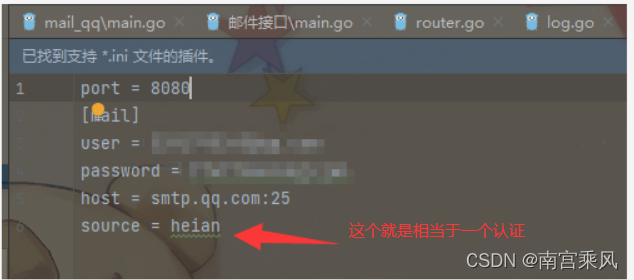
Source authentication check
This service adds a simple source validation step. After reading source from the configuration file, the handler compares it with the source value received in the request. If they do not match, the email is rejected immediately.
The configured value is:
source = heian
This is not a full authentication system, but it does provide a basic gate to prevent arbitrary callers from using the endpoint without the expected identifier.
Mail composition details
The SendToMail function uses smtp.PlainAuth and sends mail through the configured SMTP host. It supports both HTML and plain text, though the handler currently sends HTML.
The message header includes:
ToFromSubjectContent-Type
For HTML messages, the content type is:
Content-Type: text/html; charset=UTF-8
The email body is assembled as an HTML document and inserts the submitted content into the <body> section.
The sender display name is set as:
告警平台
Logging behavior
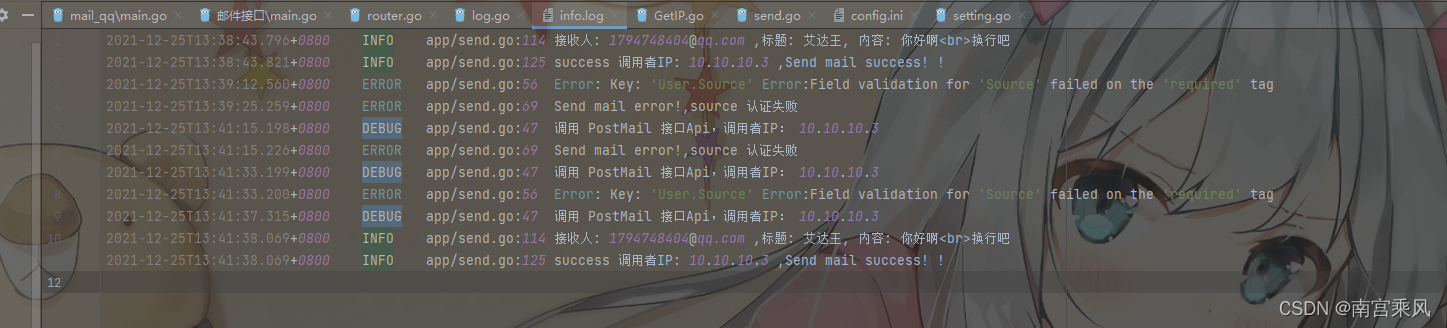
The logger records more than startup messages. During mail sending, it also stores:
- which IP called the API
- the intended recipient
- the mail subject
- the content being sent
- whether the send operation succeeded or failed
That is particularly useful when this service is used as a shared alert gateway. If a message fails, the logs provide enough detail to investigate whether the problem came from the request, the SMTP settings, or delivery.
Runtime result
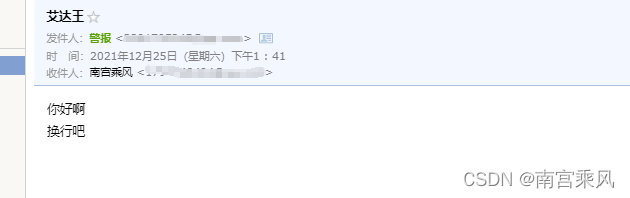
The service starts on the port defined in config.ini, exposes the /v1/send route, accepts JSON POST requests, validates the request fields, checks the source value, and sends email through the configured SMTP account.
The implementation also improves the earlier version in a very practical way: configuration is no longer hard-coded, and the codebase is no longer packed into one file. That makes the project easier to update, safer to operate across multiple machines, and more manageable when new functionality needs to be added.
Functional effect
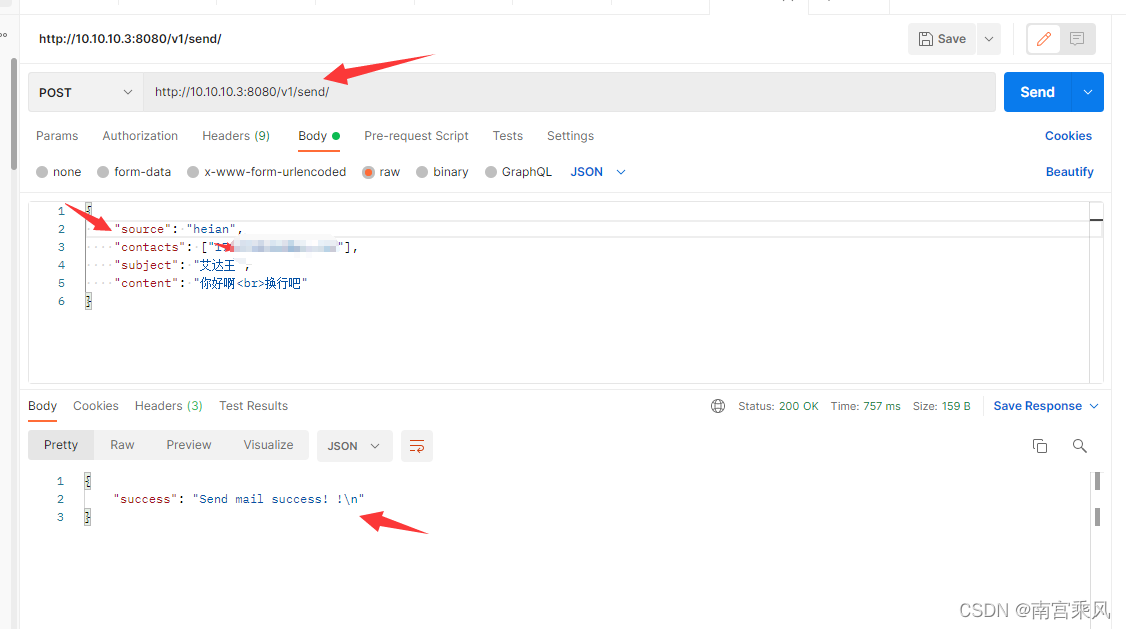
Log records