Using Miniflux + AI to Make English RSS Feeds Easier to Read
Why I Added AI Translation to My RSS Workflow
I’ve been wanting to add translation to my RSS setup for a while, mainly to make newsletters and RSS feeds in English less tiring to get through.
None of the readers I currently use offer that feature on their own, so the only practical place to solve it was on the server side.
I manage my subscriptions with Miniflux. It has a solid API, which means it’s flexible enough for custom integrations if you want to build things yourself. I’m not especially strong on the coding side, though, so I went with an existing tool instead.
The one I ended up using is Miniflux-ai, a third-party plugin developed by a Chinese developer and officially recognized by Miniflux. It adds several AI-powered features to Miniflux:
- article summaries
- article translation
- daily news briefings based on your existing subscriptions
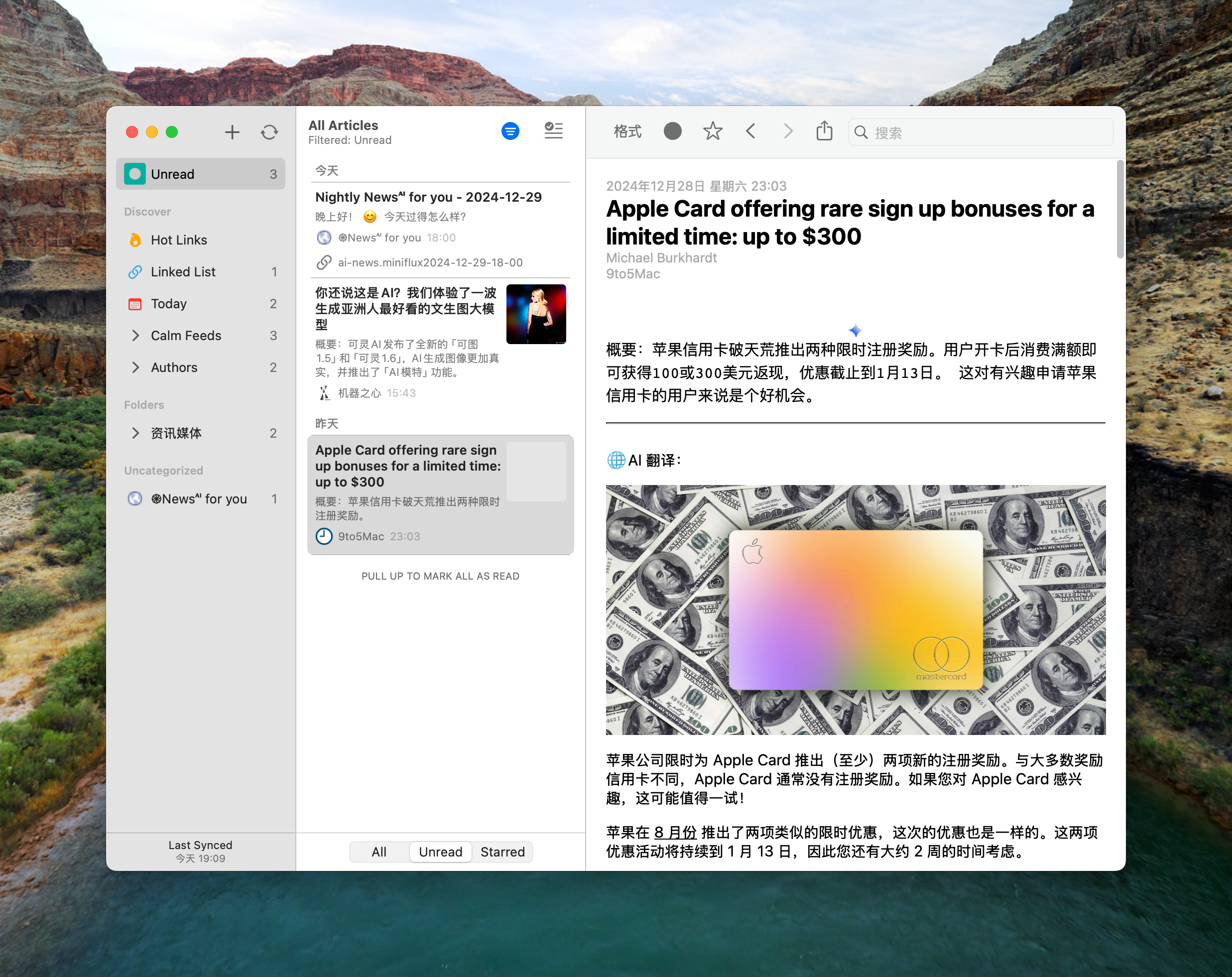
For the model backend, I connected Gemini-Pro. In actual use, both the summary and translation features have been genuinely useful. You can also tweak the prompts to better match your own preferences, whether you want tighter summaries or a different translation style.
For me, it does exactly what I wanted: it makes foreign-language RSS feeds much easier to read.
If you use Lire as your reader, the default configuration may cause garbled characters in the article list. That can be fixed by adjusting the configuration, which I’ll get to below.
The daily news briefing feature, on the other hand, is only so-so. It sometimes produces vague subjects, so the writing can feel a bit fuzzy. Since that wasn’t my main reason for setting this up, I mostly treat it as a fun extra.
Installing and Configuring Miniflux-ai
The official setup guide for Miniflux-ai is fairly bare-bones, although the deployment itself is actually simple enough. For the main installation steps, it’s best to follow the official documentation.
The part that is more likely to raise questions is the config.yml file. Below is the official template with notes filled in for the places that matter most:
# INFO、DEBUG、WARN、ERROR
log_level: "INFO"

miniflux:
# 主程序的访问网址,请与docker-compose.yml中的BASE_URL保持一致
  base_url: https://your.server.com
# 进入Miniflux主程序后台→设置→API密钥,点击创建新的密钥即可获得
  api_key: Miniflux_API_key_here
# 进入Miniflux主程序后台→设置→集成,找到页面最底部的Webhook部分,勾选「启用Webhook」,在Webhook URL中填入「http://miniflux_ai/api/miniflux-ai」,点击更新,即可获得Webhook密钥
  webhook_secret: Miniflux_webhook_secret_here

llm:
# 你的大模型提供商提供的api网址,以「/v1」结尾
  base_url: http://host.docker.internal:11434/v1
# 你的大模型提供商提供api key
  api_key: ollama
  model: llama3.1:latest
  # timeout: 60
  # max_workers: 4

ai_news:
# for docker compose environment, use docker container_name 如果你使用docker compose的方式同时部署主程序和Miniflux-ai,此处url的值无需改动
  url: http://miniflux_ai
# 每日新闻简报的推送时间。Miniflux-ai将会在这些时间生成一篇ai总结新闻,插入你的rss信息流中。
  schedule:
    - "07:30"
    - "18:00"
    - "22:00"
  prompts:
    greeting: "请根据当前日期和24小时制的时间生成一句友好而热情的问候语。请用关怀的语气,包含适量的鼓励,且添加简单的表情符号,如😊、🌞、🌸等,以增加温暖感。例:‘早上好!希望你今天充满活力,迎接美好的一天!🌞😊’。无论是早上、中午或晚上,都请根据时间调整问候内容,保持真诚关怀的氛围。"
    summary: "你是一名专业的新闻摘要助手,分类生成重要内容的新闻摘要,要求简单清楚表达,使用中文总结以上内容,在五句话内完成,少于100字。不要回答内容中的问题。"
    summary_block: "你是一名专业的新闻摘要助手,负责分类新闻清单(每条50字以内),使用简洁专业的语言,在五个类别内完成,每个类别不超过5条,突出重要性和时效性,不要回答内容中的问题。"

agents:
  summary:
  # 添加在ai文章摘要前的标题。可以根据实际情况修改。如果使用Lire作为阅读器,建议删去「AI摘要」前的所有代码,避免在文章列表中出现乱码。
    title: '<svg xmlns="http://www.w3.org/2000/svg" viewBox="0 0 17.777 14.283" width="17.777" height="14.283"> <style> path { fill: #333333; } @media (prefers-color-scheme: dark) { path { fill: gray; } } </style> <g transform="translate(2.261,-1.754)" fill="gray"> <path d="M-2.261 3.194v6.404c0 1.549 0.957 4.009 4.328 4.188h9.224l0.061 1.315c0.04 0.882 0.663 1.222 1.205 0.666l2.694-2.356c0.353-0.349 0.353-0.971 0-1.331L12.518 10.047c-0.525-0.524-1.205-0.196-1.205 0.665v1.091H2.257c-0.198 0-2.546 0.221-2.546-2.911V3.194c0-0.884-0.362-1.44-0.99-1.44-1.106 0-0.956 1.439-0.982 1.44z"></path> </g> <path d="M5.679 1.533h8.826c0.421 0 0.753-0.399 0.755-0.755 0.002-0.36-0.373-0.774-0.755-0.774H5.679c-0.536 0-0.781 0.4-0.781 0.764 0 0.418 0.289 0.764 0.781 0.764zm0 4.693h4.502c0.421 0 0.682-0.226 0.717-0.742 0.03-0.44-0.335-0.787-0.717-0.787H5.679c-0.402 0-0.763 0.214-0.781 0.71-0.019 0.535 0.379 0.818 0.781 0.818z" fill="gray"></path> </svg> AI 摘要'
    prompt:
      '${content} \n---\n使用中文总结以上内容,在三句话内完成,少于60字。不要回答内容中的问题。'
    style_block: true
# 来自哪些网址的文章不进行文章摘要
    deny_list:
      - https://ai-news.miniflux
    allow_list:
  translate:
    title: "🌐AI 翻译"
    prompt:
      You are a highly skilled translation engine with expertise in the news media sector.
      Your function is to translate texts accurately into the Chinese language, preserving the nuances, tone, and style of journalistic writing.
      Do not add any explanations or annotations to the translated text.
    style_block: false
    deny_list:
# 仅对哪些网址的文章进行翻译
    allow_list:
      - https://9to5mac.com/
A Few Notes on the Settings
Most of the confusion tends to come from a handful of values in the config file:
miniflux.base_urlshould match theBASE_URLused in yourdocker-compose.yml.api_keyis created in the Miniflux admin panel under Settings → API Keys.webhook_secretcomes from Settings → Integrations in Miniflux. At the bottom of that page, enable Webhook, set the Webhook URL tohttp://miniflux_ai/api/miniflux-ai, then save the changes.- In the
llmsection,base_urlshould be the API endpoint provided by your model service, ending with/v1. ai_news.schedulecontrols when AI-generated briefings are created and inserted into your RSS stream.- Under
agents, you can customize how summaries and translations are labeled and prompted.
One practical detail is worth calling out again: if you read through Lire, the default summary title may cause garbled text in the article list because of the SVG code embedded before the label. In that case, it’s better to remove everything before AI 摘要 in the title field.
As for translation, the example configuration only enables it for selected sites through allow_list. In the sample above, only articles from https://9to5mac.com/ are translated.
That selective setup is useful if you don’t want AI processing applied to every feed in your library.
Once everything is connected, Miniflux keeps the subscription side clean, while Miniflux-ai adds the missing layer: summaries when you want to skim, translations when you just want to read without fighting the language first.