How Chinese Works on Computers: Encodings, Keyboards, and Input Methods
Why this topic keeps coming up
Lately I have been tinkering with input methods again: setting up Rime on Windows and Arch, installing Trime on my phone, and spending time practicing Xiaohe Shuangpin. Once you start doing that, it becomes hard not to notice that “typing Chinese on a computer” is really several different problems stacked together: how text is encoded, how keys are arranged, and how software turns keystrokes into characters.
Character encodings: how 0s and 1s become text
Everyone knows computers ultimately deal in 0 and 1. What is less obvious is how those bits become the letters, punctuation marks, ideographs, emoji, and control commands we actually see on screen.
That mapping is the job of a character set, or more broadly, a character encoding. It defines which byte patterns correspond to which characters.
Among the character sets people still talk about today, ASCII is the old patriarch. Standardized in the 1960s, it mapped uppercase and lowercase English letters, digits, common punctuation, and a set of control characters onto the range 0x00~0x7F. Almost no modern software supports only ASCII anymore, but later encodings such as GB-family encodings, BIG5, UTF-8, Shift-JIS, and Windows-1252 all retained compatibility with ASCII in one way or another.
As computing spread into East Asia, the limitations of ASCII became unavoidable. ASCII has English letters, numbers, and punctuation, but no Chinese characters—nor Japanese, Korean, Tibetan, Greek, Cyrillic, and so on. So a Chinese-capable encoding quickly became necessary.
In 1980, China released its first major Chinese character encoding standard: GB2312, short for GB/T 2312-1980. It supports 6763 commonly used Chinese characters, enough for most everyday writing.
That was not the end of the story, though. GB2312 still left out many less common characters, and those missing characters would surface often enough to be annoying. Later standards expanded the set: GBK and GB18030 (the latter named from GB 18030-2022) grew the available repertoire to more than twenty thousand and then more than seventy thousand characters and symbols. They also cover some han characters used in Japanese and Korean, as well as minority names and scripts. These standards are forward-compatible in a practical sense: a document saved in GB2312 can be read fine as GBK or GB18030. But if a document was written in GB18030 and you try to read it as GB2312, only the overlapping characters will display correctly; unsupported characters may show up as ? or �, or the decoder may fail outright.
Domestic standards solved domestic needs, but once information started moving across borders, problems multiplied. Different encodings could interpret the same bytes in completely different ways. To make global text exchange workable, a universal standard was needed. That is the context in which the first version of Unicode was officially released in 1994.
Unicode can be implemented in several forms, and the best known by far is UTF-8. One big reason for its success is that it is the only Unicode encoding that remains compatible with ASCII. Unicode covers an enormous range of writing systems, symbols, emoji, and control characters, and it also allows combinations that create new visible forms from existing code points. In practice, UTF-8 has become the dominant text encoding worldwide.
Why mojibake happens
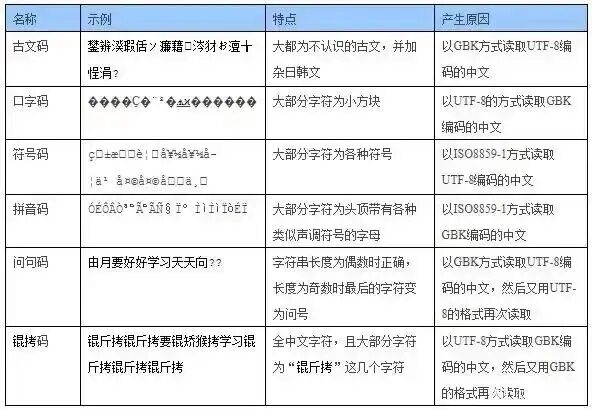
As good as Unicode is, it is not compatible with the older GB-family encodings. Open a GBK file as UTF-8, or open a UTF-8 file as a GB-family encoding, and you get mojibake. Sometimes editors try to be helpful during this process; if a file is decoded incorrectly and then saved again, the original text may remain garbled even when reopened with the right encoding later.
That is where classic Chinese computing jokes like “锟斤拷” and “烫烫烫” come from.
- “锟斤拷”: if you open a GBK-encoded text as UTF-8, invalid byte sequences may be replaced by the replacement character
�(U+FFFD, theReplacement Character). In UTF-8, that character is encoded as the three bytes0xEF 0xBF 0xBD. If several�characters appear in a row, such as two consecutive ones, the underlying bytes areEF BF BD EF BF BD. Now decode that byte stream incorrectly as GBK:EF BFbecomes “锟”,BD EFbecomes “斤”, andBF BDbecomes “拷”. That is how the famous “锟斤拷” appears. - “烫烫烫”: this one is associated mainly with the Visual C++ toolchain on Windows. In Debug mode, uninitialized stack memory is filled with
0xCC, and uninitialized heap memory with0xCD. In the GBK character set, two consecutive0xCCbytes happen to map to “烫”, while0xCD 0xCDmay map to “屯” or?, depending on the version. So if you accidentally print an uninitialized local array, the screen may flood with “烫烫烫烫”, as if the memory itself has a fever.
One more complication: the default terminal code page on Chinese editions of Windows still belongs to the GB-family by default. That means if your source code is written in UTF-8, Chinese text may become garbled during compilation or runtime output. It is also why many people still recommend avoiding non-ASCII characters in Windows usernames and file paths—you never know which old tool will suddenly break. Windows terminals do provide the chcp command to switch code pages. Adding chcp 65001 to the terminal profile on startup is a common way to force UTF-8.
The keyboard problem came long before modern input methods
The problem of entering Chinese text is at least as old as the problem of encoding it. English writing systems have a small alphabet, which made mechanical typewriters relatively straightforward. Chinese is a different story: even common use involves thousands of characters, so a conventional typewriter is much harder to design.
There were purely mechanical attempts, including Zhou Houkun’s indexed typewriter and Shu Zhendong’s Shu-style typewriter. Later, with electronics, there was also Lin Yutang’s Ming Kwai typewriter, which used 72 keys. You would enter two character components, see eight candidate characters, and then choose one with a number key.
Once computing arrived, Chinese text entry actually became simpler in one important sense. You no longer needed trays full of physical type pieces waiting to be selected; you just needed a way to map the intended character to its encoded form. Broadly speaking, Chinese computer keyboards developed along three lines:
- Whole-character large keyboards: each key corresponds directly to a character. The advantage is obvious—you press what you want to enter. The downsides are equally obvious: the keyboard becomes huge, expensive, hard to search visually, and any character not on the keyboard is impossible to type.
- Decomposition keyboards: characters are broken into components or roots, and combinations of main and auxiliary keys are used to select the character. This greatly reduces the number of keys needed, but the learning cost is high.
- Reusing the English keyboard: keep the standard Latin keyboard and use software rules to convert keystrokes into Chinese characters. This approach only requires software, not custom hardware, and it eventually became the mainstream solution.
Input methods: turning keystrokes into Chinese
Once the standard Latin keyboard became the foundation, the next question was how to map key sequences to Chinese characters.
The most obvious approach is phonetic input. Chinese already had systems for marking pronunciation—Hanyu Pinyin, Wade-Giles, Zhuyin, and others—so those could be mapped onto a keyboard. Pinyin is especially convenient because its letters are already Latin letters, with only ü needing special handling, usually mapped to v. Zhuyin is a little more complicated because it uses a separate symbol system, has more symbols than the Latin alphabet, and therefore needs to borrow from number and punctuation keys as well.
A different approach is shape-based input. Instead of pronunciation, you decompose a character into strokes or components, map those onto keys, and enter them in a prescribed order. Representative systems include Cangjie, created by Chu Bong-Foo in 1976, and Wubi, created by Wang Yongmin in 1983.
In raw efficiency terms, shape-based methods have a much higher ceiling than phonetic ones. Chinese has many homophones, so pinyin or zhuyin inevitably produce a lot of collisions: after typing the sound, you still need time to choose the intended character. Shape-based methods have far fewer duplicates. But input methods became smarter over time. Systems such as Microsoft Pinyin, developed with support from HIT, the Smart ABC method associated with Peking University’s Zhu Shoutao, and later the rise of Sogou Input Method pushed the ecosystem toward whole-word entry instead of single-character entry. Predictive suggestions and contextual language models dramatically reduced the practical burden of phonetic ambiguity. Shape-based methods, with their steeper learning curve, gradually lost ground.
Why Shuangpin exists
Even so, full pinyin has an obvious weakness: it requires too many keystrokes. That is where Shuangpin comes in.
The basic idea is simple. Most Chinese syllables can be analyzed as an initial plus a final. There are many different initials, but they are short; finals come from a smaller set, but many of them are longer to type in full pinyin. A large portion of pinyin’s keystroke count comes from those long finals. So why not remap each final to a single key?
That is exactly what Shuangpin does. The initial takes one key, and the final also takes one key. If a syllable consists only of a simple final, it is still mapped according to rules into a two-key pattern, creating a stable “two keys per character” rhythm. Compared with full pinyin, Shuangpin cuts keystrokes sharply, improves input efficiency to some extent, and remains much easier to learn than full shape-based systems.
But Shuangpin is still phonetic input, which means it cannot eliminate homophone collisions. To address that, some methods brought shape information back into the picture and created hybrid phonetic-shape systems. The user first enters the pronunciation, then adds shape codes—often based on the beginning and ending components of the character—to narrow down the candidates. The goal is to keep keystrokes low while also reducing ambiguity.
Smartphones changed the problem again
The smartphone era forced Chinese input methods to adapt to a new physical constraint: the screen is too small for a comfortable full-size keyboard.
That led to two mainstream virtual keyboard layouts:
- Nine-key keypad (T9 style): letters are distributed across a 3×3 grid, with each key holding 3 to 4 letters. The big advantage is large tap targets and decent blind tapping. The drawback is extremely high ambiguity. For example,
226could correspond to multiple pinyin combinations such as “ban”, “cam”, or “bao”. In practice, mobile input methods compensate with dictionaries and contextual prediction, which is why the nine-key layout remains very popular among pinyin users. - Full keyboard (QWERTY): all 26 letters remain available on the screen. The keys are tiny, but users gain access to gestures such as tapping, flicking, and swiping. For Shuangpin and shape-based users, this is almost the only viable option because they need exact letter distinctions.
Between those two, there are also compromise layouts trying to balance key size and ambiguity.
- 14-key layouts: examples include T+2 and dedicated Shuangpin keyboards. These are common in some third-party input methods as “Shuangpin-only” or mixed stroke-plus-pinyin layouts. The 26 letters are redistributed across 14 keys, often grouped by frequency, with each key representing one or two letters. Compared with nine-key layouts, ambiguity is lower; compared with full QWERTY, the keys are larger. For Shuangpin users this feels especially natural, because Shuangpin itself is built around “one key for the initial + one key for the final,” and 14 keys are enough to cover the necessary mappings. In Xiaohe Shuangpin, for example,
vstands forzh,uforsh, andiforch, while many other letters keep straightforward assignments. A lot of Shuangpin users switch to 14-key mode on their phones specifically to get a larger tapping area without giving up the structure they use on desktop. - 12-key experimental layouts: things like NEO or Morse-inspired groupings show up from time to time. These are much rarer. They usually require dedicated learning and are almost never provided by mainstream input methods by default, though they do get discussed occasionally in enthusiast circles, especially around custom Rime schemas.
- Adaptive layouts: these dynamically change key size or arrangement based on current context. For example, after you type
w, the system may predict thatooreis likely next and enlarge those keys. This approach is not mainstream yet, but it points toward more personalized and intelligent input systems.
Among mobile layouts, 14-key mode is one of the most attractive options for Shuangpin users today. It avoids the core weakness of nine-key layouts—multiple letters sharing a key, which undermines Shuangpin’s one-initial/one-final certainty—while also reducing the mistaps that are common on full QWERTY. If you already use Xiaohe Shuangpin on a computer, enabling a 14-key Shuangpin layout on your phone can feel surprisingly close to a direct transfer of muscle memory.
Mobile devices also brought new input styles
Phones did not just shrink the keyboard; they also made room for entirely different ways to enter text.
- Swipe typing (Swype / Glide Typing): instead of tapping each letter, you drag a finger continuously across the letters that make up a word or pinyin sequence, and the algorithm infers the intended input from the path. This is very effective in English and has some support in Chinese pinyin as well.
- Voice input: as speech recognition improved, voice input became much more practical on mobile than on desktop. For long passages or situations where your hands are busy, speaking can be much faster than typing. It still has limitations, especially in quiet spaces where speaking is awkward or when dialect accents interfere with recognition.
Chinese on computers is therefore not one single invention but a layered system: encodings decide how text is stored, keyboards define the physical or virtual interface, and input methods bridge human habits with machine representation. Once you start adjusting one layer—say, moving from full pinyin to Xiaohe Shuangpin—you inevitably end up touching the others as well.