Making WordPress Data Survive Pod Restarts in Kubernetes
In the previous stage, the WordPress deployment already had encrypted account information and time synchronization in place. The next problem is more fundamental: data cannot stay inside the container.
If MySQL or WordPress stores its data only in the container filesystem, a restart or deletion of the Pod can wipe everything out. For this simulation, the storage backend is NFS. In a stricter production setup, Ceph would be a better fit because it provides stronger safety and high availability, but NFS is simple enough for demonstration.
Preparing NFS
First install the required NFS components and create a directory for shared storage:
#安装
yum install -y nfs-utils rpcbind
mkdir -p /data/nfsdata

# 修改配置
$ vim /etc/exports
/data/nfsdata 192.168.31.* (rw,async,no_root_squash)

# 使配置生效
$ exportfs -r

# 服务端查看下是否生效
$ showmount -e localhost
Export list for localhost:
/data/nfsdata (everyone)
Installing nfs-client with Helm
Add the Helm chart repository:
stable    https://kubernetes.oss-cn-hangzhou.aliyuncs.com/charts
helm添加这个源
Download and unpack the chart, then adjust values.yaml:
下载helm包
helm pull aliyuncs/nfs-client-provisioner

解压
tar -zxvf nfs-client-provisioner-1.2.8.tgz

修复values.yaml 三处
image:
  repository: quay.io/external_storage/nfs-client-provisioner
  tag: v3.1.0-k8s1.11
  pullPolicy: IfNotPresent

nfs:
  server: 192.168.31.73
  path: /data/nfsdata

reclaimPolicy: Retain
Install or uninstall the provisioner as needed:
安装
helm install nfs-client-provisioner -n nfs .

卸载
helm uninstall -n nfs nfs-client-provisioner
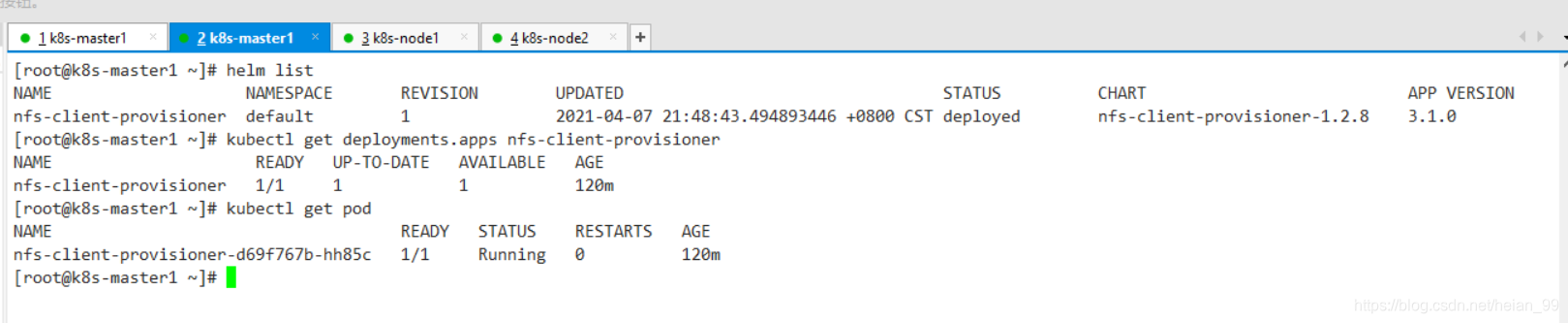
Persisting MySQL data
MySQL only needs one Pod to mount the storage for reading and writing, so the PVC uses ReadWriteOnce.
mysql-nfs.yaml.yaml
apiVersion: v1
kind: PersistentVolumeClaim
metadata:
  name: mysql-nfs
  namespace: kube-example
  labels:
    app: mysql
spec:
  storageClassName: "nfs-client"  #存储后端
  accessModes:
    - ReadWriteOnce   #允许一个容器连接,读写
  resources:
    requests:
      storage: 1G  #存储量
mysql.yaml
apiVersion: v1
kind: Service
metadata:
  name: wordpress-mysql
  namespace: kube-example
  labels:
    app: wordpress
spec:
  selector:
    app: wordpress
    tier: mysql
  ports:
    - port: 3306
      targetPort: dbport
---
apiVersion: apps/v1
kind: Deployment
metadata:
  name: wordpress-mysql
  namespace: kube-example
  labels:
    app: wordpress
    tier: mysql
spec:
  replicas: 1
  template:
    metadata:
      name: wordpress-mysql
      labels:
        app: wordpress
        tier: mysql
    spec:
      containers:
      - name: mysql
        image: mysql:5.6
        args:
          - --character-set-server=utf8mb4
          - --collation-server=utf8mb4_unicode_ci
        volumeMounts:
          - mountPath: /var/lib/mysql
            name: mysql-nfs
        ports:
        - containerPort: 3306
          name: dbport
        env:
        - name: MYSQL_ROOT_PASSWORD
          valueFrom:
            secretKeyRef:
              key: MYSQL_ROOT_PASSWORD
              name: db.conf
        - name: MYSQL_DATABASE
          valueFrom:
            secretKeyRef:
              key: MYSQL_DATABASE
              name: db.conf
        - name: MYSQL_USER
          valueFrom:
            secretKeyRef:
              key: WORDPRESS_DB_USER
              name: db.conf
        - name: MYSQL_PASSWORD
          valueFrom:
            secretKeyRef:
              key: WORDPRESS_DB_PASSWORD
              name: db.conf
        imagePullPolicy: IfNotPresent
        resources:
          limits:
            cpu: 1000m
            memory: 400Mi
          requests:
            cpu: 1000m
            memory: 400Mi
        startupProbe: #首次启动探测(如果没有成功,不会运行下面livenessProbe)
          tcpSocket:
            port: 3306
          failureThreshold: 2 #探测成功后,最少连续探测失败多少次才被认定为失败。默认是3。最小值是1。
          initialDelaySeconds: 20 # 容器启动后第一次执行探测是需要等待多少秒
          timeoutSeconds: 10 # 探测超时时间。默认1秒,最小1秒。
          periodSeconds: 10 # 执行探测的频率。默认是10秒,最小1秒。
      restartPolicy: Always
      volumes:
        - name: mysql-nfs
          persistentVolumeClaim:
            claimName: mysql-nfs
  selector:
    matchLabels:
      app: wordpress
      tier: mysql
Persisting WordPress files
The WordPress application runs with multiple replicas. Because several Pods may need to read from and write to the same shared files at the same time, its PVC must use ReadWriteMany.
wordpress-nfs.yaml
apiVersion: v1
kind: PersistentVolumeClaim
metadata:
  name: wordpress-nfs
  namespace: kube-example
  labels:
    app: wordpress
spec:
  storageClassName: "nfs-client"
  accessModes:
    - ReadWriteMany
  resources:
    requests:
      storage: 2G
wordpress.yaml
apiVersion: v1
kind: Service
metadata:
  name: wordpress
  namespace: kube-example
spec:
  selector:
    app: wordpress
    tier: frontend
  ports:
    - port: 80
      name: web
      targetPort: wdport
  type: ClusterIP
---
apiVersion: apps/v1
kind: Deployment
metadata:
  name: wordpress
  namespace: kube-example
  labels:
    app: wordpress
    tier: frontend
spec:
  selector:
    matchLabels:
      app: wordpress
      tier: frontend
  replicas: 3 #多副本+pod的反亲合力可以实现pod的高可用
  template:
    metadata:
      name: wordpress
      labels:
        app: wordpress
        tier: frontend
    spec:
      containers:
      - name: wordpress
        image: wordpress:5.3.2-apache
        ports:
        - containerPort: 80
          name: wdport
        #pvc挂载到容器目录
        volumeMounts:
          - mountPath: /var/www/html
            name: wordpress-nfs
        env:
        - name: WORDPRESS_DB_HOST
          valueFrom:
            secretKeyRef:
              key: WORDPRESS_DB_HOST
              name: db.conf
        - name: WORDPRESS_DB_USER
          valueFrom:
            secretKeyRef:
              key: WORDPRESS_DB_USER
              name: db.conf
        - name: WORDPRESS_DB_PASSWORD
          valueFrom:
            secretKeyRef:
              key: WORDPRESS_DB_PASSWORD
              name: db.conf
        imagePullPolicy: IfNotPresent
        resources:
          limits:
            cpu: 800m
            memory: 150Mi
          requests:
            cpu: 800m
            memory: 150Mi
        startupProbe: #首次启动探测(如果没有成功,不会运行下面livenessProbe)
          httpGet:
            port: 80
          failureThreshold: 2 #探测成功后,最少连续探测失败多少次才被认定为失败。默认是3。最小值是1。
          initialDelaySeconds: 20 # 容器启动后第一次执行探测是需要等待多少秒
          timeoutSeconds: 10 # 探测超时时间。默认1秒,最小1秒。
          periodSeconds: 5 # 执行探测的频率。默认是10秒,最小1秒。
        readinessProbe: # (就绪检查)
          # 如果检查失败,kubernetes会把Pod从service endpoints中剔除
          tcpSocket:
            port: 80
          initialDelaySeconds: 10
          timeoutSeconds: 5
          failureThreshold: 5
          periodSeconds: 5
          successThreshold: 3
      affinity:
        podAffinity:
          preferredDuringSchedulingIgnoredDuringExecution:
          - weight: 1
            podAffinityTerm:
              topologyKey: kubernetes.io/hostname
              labelSelector:
                matchExpressions:
                - key: app
                  operator: In
                  values:
                  - wordpress
      restartPolicy: Always
      #挂载的pvc
      volumes:
        - name: wordpress-nfs
          persistentVolumeClaim:
            claimName: wordpress-nfs
Testing the result

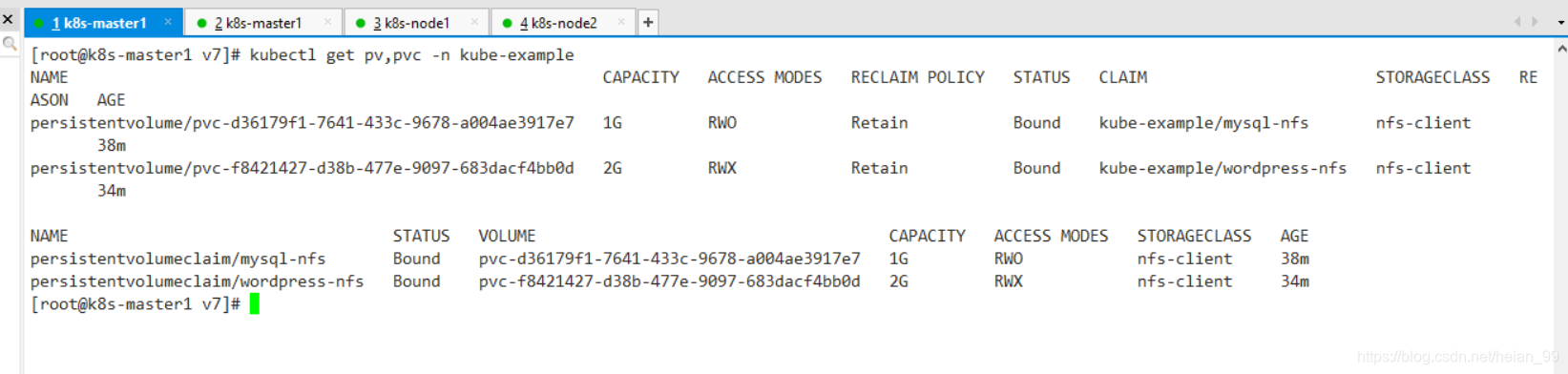
After this change, deleting or restarting Pods will no longer cause the WordPress or MySQL data to disappear. The data is stored on a fixed backend node and accessed over the network through the mounted NFS volumes.
One point still matters: NFS is suitable for testing environments, or for cases where the data is not important. If the data matters, Ceph should be used as the Kubernetes storage backend instead.
This WordPress simulation is already close to the end of its first version, but it is still much simpler than a real production environment. Production deployments require more work around complexity, safety, and reliability, and can be improved step by step later.