Website Caching Can Help, but the Trade-Offs Matter More
If you run a dynamic blog—Typecho, WordPress, or anything similar—and it feels a bit slow, the usual advice appears almost immediately: dynamic CMS platforms consume more resources, so just install a caching plugin. You do that, run a few tests, and sure enough, the site responds faster.
That part is real enough.
The more interesting question is what comes after: if caching is such an easy win, why isn’t every dynamic CMS simply shipped with aggressive caching enabled by default and everyone told to stop thinking about it?

Caching is useful, sometimes extremely useful. But it is not free, and it is not universally appropriate. Whether it is worth doing depends on what kind of slowness you are actually dealing with, how your site works, and how much complexity you are willing to absorb.
One important scope note before getting into the details: everything below is about caching dynamically generated pages. Unless specifically mentioned, this is not about browser caching for static assets such as images, CSS, or JavaScript.
Dynamic CMS performance and why caching seems so appealing
The long-running argument between dynamic CMS sites and static sites is unlikely to end anytime soon. Both sides have obvious strengths. Dynamic systems are easy to update and manage. Static sites tend to be lighter, simpler, and better at handling concurrency under the same hardware constraints.
On one point, though, people usually agree: a dynamic CMS generally consumes more server resources.
That is not surprising. When someone visits a dynamic site, the CMS typically has to query the database, execute application logic, assemble the page, and only then return HTML. A static site, by comparison, can often just read a file and send it back. The second path is naturally cheaper.
So the most intuitive idea is also the most common one: if the content of a page does not change often—say, a published post that is rarely edited—why generate it again and again? Why not keep the generated result and serve that directly next time? In theory, that lets you keep the convenience of a dynamic backend while moving performance closer to a static site.
That is why every CMS ecosystem has a pile of cache plugins promising faster page loads, lower resource usage, and higher QPS.
The pitch sounds perfect. Faster responses, lower load, more traffic capacity. But if caching were only upside, there would be no real discussion to have. You would install whichever plugin has the nicest name and be done with it.
What "cache" usually means in practice
Before talking about the downsides, it helps to separate a few common approaches.
Full-page cache
This is the most intuitive form. Once the CMS generates a page, the entire output is stored. The next request bypasses regeneration and returns the cached page directly.
Fragment or partial cache
Instead of caching the whole page, only certain expensive sections are cached—tag clouds, recent comments, sidebar statistics, and similar elements. This gives finer control and is common on larger sites where even partial optimization can save a lot of backend work.
From there, implementation choices branch out.
CMS cache plugins: convenient, but not magic
For many site owners, plugins are the first caching method they encounter because they are easy to install and often require little or no extra configuration.
To keep the concept precise, consider one common class of plugins: plugins that use the dynamic runtime itself—such as PHP—to decide whether a cache exists and then output the cached content.
The basic principle can be as simple as this:
<?php
    $cacheFileName = 'cache-demo.html';

    // 判断是否有缓存
    if(file_exists($cacheFileName)) {
        include $cacheFileName;
        die();
    }

    // 启动并清空缓冲区
    ob_start();
    ob_clean();

    // 模拟页面逻辑
    echo('这是动态页面测试<br>');
    echo('现在是:');
    echo(date('Y-m-d H:i:s', time()) . '<br>');
    echo('模拟耗时的业务逻辑:');
    sleep(2);
    echo(bin2hex(random_bytes(32)) . '<br>');

    // 写缓存
    file_put_contents($cacheFileName, ob_get_contents());
?>
If the cache file exists, the script includes it and exits. If not, it runs the normal page logic, captures the output buffer, and saves the result for the next request. That is the basic full-page cache model in a nutshell.
Many so-called plug-and-play cache plugins work on this core idea, even if they add extras such as support for Redis or Memcached, rules for when to bypass caching, and hooks to clear cached pages after content changes.
In Typecho, for example, the logic can be attached very early in the request lifecycle. A simplified excerpt looks like this:
// 读缓存,Hook在index.php/begin下
function C() {
    $data = self::getCache(); // 接缓存引擎
    $html = $data['html'];
    header("TpCache: HIT");
    echo($html);
    die();
}

// 写缓存,Hook在index.php/end下
function S($html = '') {
    if (empty($html)) {
        $html = ob_get_contents();
    }
    $data = array();
    $data['time'] = time();
    $data['html'] = $html;
    self::setCache($data); // 接缓存引擎
}
When the cache is hit early enough, the CMS can avoid a large amount of later work—routing, database queries, and other application logic. So yes, this kind of plugin can reduce resource usage in a meaningful way.
But there is also a ceiling. Because the plugin itself runs inside the CMS stack, the request still has to reach PHP, the core framework still has to start up to some degree, and database-related initialization may still occur before the plugin gets control. So while plugin caching helps, it does not eliminate as much overhead as caching done further upstream.
Using try_files in Nginx
Nginx has a directive called try_files, which checks files in order and stops at the first one that exists. That makes it tempting to use for a lightweight full-page cache setup:
# 这里只给出关键部分
location / {
    try_files /cache$uri.html $uri $uri/ /index.php?$query_string;
}
The idea is straightforward. If a corresponding cached HTML file exists, Nginx serves it directly. If not, the request falls back to the dynamic script, which can generate the page and write the cache for later.
In theory, this is elegant. In practice, it can be awkward.
Testing on a real machine did not produce especially satisfying results here. Handling GET parameters cleanly was troublesome; adding $query_string created its own issues; and depending on rewrite rules, requests sometimes fell through to the dynamic backend anyway. The concept is not wrong, but the setup can become fragile enough that it stops being worth the effort.
The bigger lesson is still useful: the earlier in the request chain you can satisfy a cache hit, the more backend work you avoid.
For Nginx, there is usually a more robust way to do that.
fastcgi_cache: more effective, more stable
Since PHP commonly talks to Nginx over FastCGI, Nginx can cache the output returned by PHP-FPM. This is also a full-page cache, but now the cache is handled by the HTTP server rather than by the application itself.
A typical setup might look like this:
http {
    # 配置缓存路径
    # levels=1:2 缓存文件路径格式
    # keys_zone  缓存键的内存区,这里起名字叫page_cache,容量50MB
    # inactive   缓存超时时间
    # max_size   最大占用空间
    fastcgi_cache_path /var/fastcgi_cache levels=1:2 keys_zone=page_cache:50m inactive=120m max_size=1G use_temp_path=off;

    # 在更新缓存,上游错误等情况下,继续使用缓存
    fastcgi_cache_use_stale updating error timeout invalid_header http_500;

    # 缓存过期时,只让一个请求触发后端
    # 其他的等着,超时5s,缓解缓存击穿问题
    fastcgi_cache_lock on;
    fastcgi_cache_lock_timeout 5s;

    # ... 省略其他配置项 ...
}

server {
    # ... 省略其他配置项 ...
    location ~ \.php$ {
        # ... 省略其他配置项 ...

        # 启用缓存,指向page_cache缓存区
        fastcgi_cache page_cache;

        # 只缓存GET HEAD请求
        fastcgi_cache_methods GET HEAD;

        # 缓存key格式
        fastcgi_cache_key $request_method$scheme$host$request_uri;

        # 针对不同状态码,设置不同缓存有效期
        # 如果需要动态调整缓存有效期
        # 可以在PHP中动态返回X-Accel-Expires这个内部标头
        fastcgi_cache_valid 200 301 302 30m;
        fastcgi_cache_valid any 1m;

        # 如果存在某些请求头,则绕过缓存
        fastcgi_cache_bypass $http_pragma $http_authorization $http_cache_control;
        fastcgi_no_cache $http_pragma $http_authorization $http_cache_control;

        # 缓存状态指示
        add_header X-Cache-Status $upstream_cache_status;
    }
}
This can add caching without altering the original PHP application. When a cache hit occurs, PHP does not run at all. No PHP-FPM process needs to generate the page, and no database connection is established for that request. That makes it more efficient than application-level caching.
In actual testing, this approach behaved far more predictably than the try_files trick, especially because Nginx handles cache keys internally. It is also flexible: the backend can return an X-Accel-Expires header to adjust cache lifetime dynamically for the current URL. That makes it possible to cache the homepage for five minutes, the RSS feed for two hours, article pages for a day, and so on.
There is, however, a practical annoyance: actively purging cache is only supported in the commercial edition, Nginx Plus. Without that, two common workarounds are either using a third-party module such as ngx_cache_purge or deleting the cache files directly after calculating their paths.
For a levels=1:2 layout, the path calculation can be done like this:
<?php

    $host = "请求的Host字段,如 example.com";
    $request_method = '请求方法,应大写,如 GET';
    $scheme = '协议,应小写,如 http或https';
    $request_uri = '要删除的原路径,如 /';

    $cachePath = '上面配置里设置的缓存目录,末尾加个斜杠';

    # 按照设定的缓存Key的格式,计算缓存Key
    $key = hash('md5', $request_method.$scheme.$host.$request_uri);

    # 路径格式设置为 levels=1:2
    # 即,取末尾第一个字符,和接下来的两个字符(取出后保持正序)
    $l_1  = substr($key, -1, 1);
    $l_2  = substr($key, -3, 2);

    echo('应删除:'.$cachePath.$l_1.'/'.$l_2.'/'.$key);

?>
Run it with the right values and it will tell you which file to delete.
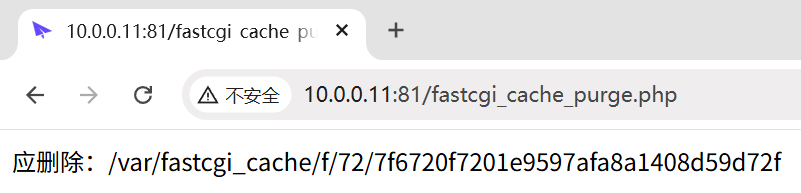
Open the file and you can see the metadata Nginx stores along with the cached page body.

It is not the most graceful solution, but it works.
Incidentally, some "high-performance cache plugins" for CMS platforms rely on the same general idea: the plugin mostly manages rules and purge events, while the real caching happens in the HTTP server. LiteSpeed Cache in WordPress is a familiar example—there is a general mode for broad compatibility, but the more powerful mode depends on LiteSpeed server software.
Edge caching beats origin caching when available
Everything above happens on the origin server. That is useful if the site lives on a single machine. But if the site already sits behind a CDN or a reverse proxy layer, then an even better option may exist: cache at the edge.
That means requests can be answered by edge nodes before they ever reach the origin. In terms of origin resource savings, this is better than any server-side cache at the source.
Most CDN services do not cache dynamic content automatically, but many let you define rules if you want to. For example, with Cloudflare, you can create cache rules to cache the homepage and article paths while bypassing API routes. There are even settings that allow caching POST requests, which is a rather exotic thing but technically possible.

If you are running your own reverse proxy or front-line relay machine, Nginx can also do similar work with proxy cache. Conceptually it is close to fastcgi_cache, just applied to proxied upstream responses.
Partial caching in the theme layer
A dynamic CMS usually separates the core system from the theme. Since altering theme code is often safer and easier than patching core code, some higher-traffic sites customize themes heavily—for visual reasons, feature additions, or performance tweaks.
One such tweak is fragment caching.
Suppose the sidebar shows post count, comment count, recent posts, and archives. Those elements still require database reads or computation, but they are often less critical than the main article body. Theme code for that kind of block may look something like this:
<?php $data = getData(); ?>
<div>
    <span>文章数:<?= $data['post_count'] ?></span>
    <span>评论数:<?= $data['comment_count'] ?></span>
    <div>
        最新文章:<?= $data['new_post']['title'] ?>
    </div>
</div>
Whether the page is server-rendered directly or data comes from an internal API, the expensive work is still happening inside something like getData(). If that function is modified so it computes once, stores the result in a cache store, and serves later requests from there, then that section becomes cached without freezing the entire page.
A practical example is a "daily recommendation" module. Instead of recalculating randomly on every request, it can be generated once each day at 4 a.m., stored in Redis, and then reused for everyone until the next refresh. It does not save as much as full-page caching, but it still cuts needless work.
There is no silver bullet
Once the mechanics are understood, the real question is no longer "Can caching speed up a dynamic site?" It can. The harder question is whether caching is actually the thing your site needs most.
Slow does not automatically mean "needs cache"
Many people reach for caching because the site feels slow. That is understandable, but "slow" is not one single problem.
Imagine webpage delivery as sending a package. If delivery is slow, building a warehouse closer to the customer may help. But before doing construction, it would be wise to check whether the package is wrapped in 114514 layers of unnecessary material.
That is a very common blind spot. A site can feel slow for reasons that have little to do with dynamic page generation.
Many personal blogs simply do not get enough traffic for backend rendering to be a serious bottleneck. A site with one or two hundred page views a day and only two or three simultaneous users is, by ordinary estimates, nowhere near stressing even modest hardware. In plenty of cases, the server is mostly idle.
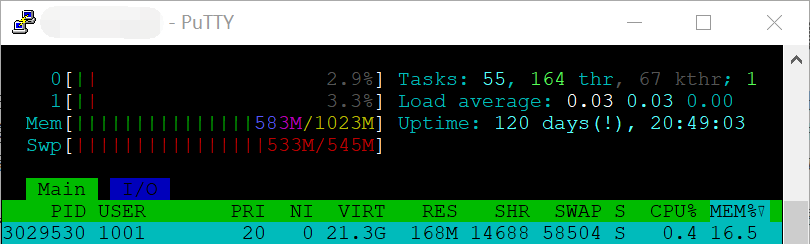
A Raspberry Pi 3 from many years ago could handle that level of traffic. A modern VPS certainly can. In those situations, the dynamic CMS often is not the main factor behind bad user experience.
A classic example is simply too much stuff on the page. Large images, elaborate backgrounds, animated effects, heavy fonts, background music, floating widgets, Live2D characters, oversized JS bundles, excessive CSS—those assets all cost time to download, parse, and render. Caching the HTML cannot make them disappear. Even if the page itself were fully static, the browser would still need to fetch and render all of that.
This is also why simple benchmark tools can be misleading. A common ritual is to run ab, throw 114 threads and 514 requests at a page, and celebrate that throughput increased by several times after caching was enabled. But load testing tools do not reflect real user experience. They fetch HTML only. They do not load all the dependent assets, they do not execute JavaScript, and they do not render the page.
Suppose the backend originally needs 50 ms to generate the page, while page assets need 3 seconds to load and the browser needs another 300 ms to render. Total visible load time is 3.35 seconds. If caching cuts page generation from 50 ms to 1 ms, that is a 50x improvement in one layer—but the real page still loads in about 3.301 seconds. The user will not be nearly as impressed as the benchmark output suggests.
Another example is poor network quality. You might rent a server advertised with excellent CPU and memory specs, but if the data center is far away and the route quality is bad—long latency, awkward return paths, painful TLS setup—then the bottleneck is the network path between visitor and server. In that case, tuning origin-side caching does not solve the most visible problem.
And that is before considering other issues: render-blocking assets, slow third-party CDNs for scripts or stylesheets, inadequate bandwidth, or cheap hosting plans with severe throughput limits. If attention stays fixed on caching alone, you can optimize yourself all the way to a static site and still see only marginal real-world improvement.
Cache invalidation is where the trouble starts
The hard part about caching is not storing the page. The hard part is making sure the right things stop being cached at the right time.
As a technical matter, once a cache is created, it keeps being used until it either expires or is actively purged. That is the entire point. Site owners often look at their blog and think: posts rarely change, the homepage only changes when a new article is published, so caching should be straightforward.
Then the cracks start to appear:
- updating a post or receiving a new comment does not refresh the page cache
- RSS or sitemap output lags behind
- page view counters become inaccurate or stop working
- the comment system breaks even if the API itself is not cached
- someone sees another user’s comment-related state
Set-Cookiegets cached accidentally and login state leaks
Once things like that happen, debugging becomes unpleasant. Is the cache at fault? Is another plugin involved? Is it the CMS? The answer may be all of the above.
Caching is not inherently bad, but it is not something that automatically adapts itself cleanly to every site.
A cache layer modifies the behavior of the original system from multiple angles. If you want content updates to purge cache correctly, you need to hook into the right events: post edits, comment creation, page updates, perhaps even custom content operations added later. Miss one event and stale pages remain in circulation.
That sounds manageable until a small overlooked detail breaks a user-facing feature.
The CSRF token problem
Comments are a good example because they look harmless. At first glance, it seems easy: cache the page, do not cache the comment API, purge after successful posting, and everything should work.
But some comment systems include a CSRF token directly in the rendered HTML:
<form action="/archive/<id>/comment" method="post">
    <!-- 下面仨哥们对缓存没有太大意见 -->
    <input type="text" name="nickname">
    <input type="text" name="email">
    <textarea name="comment"></textarea>

    <!-- 我们中出了一个叛徒 -->
    <input type="hidden" name="csrf_token" value="some-random-value">

    <!-- 他对缓存也没有意见 -->
    <button type="submit">提交评论</button>
</form>
That csrf_token is supposed to be generated dynamically by the backend. On submission, the server checks whether it matches the value it expects. If the page is served from full-page cache, the token embedded in the HTML can become stale or fixed, while the backend logic that would normally generate and track fresh state may no longer run as expected. Perfectly legitimate comment submissions can then be rejected as invalid.
Mainstream ways around this usually involve separating dynamic and static concerns more carefully. Cache what can safely be cached; fetch truly dynamic elements with JavaScript in real time; or use techniques such as SSI or ESI so cached pages can still contain placeholders that are filled dynamically when needed.
The goal is always the same: some parts of the page may be static, but some must remain live.
Plugins are useful, but their compatibility has a cost
A reasonable response is to say: fine, I do not want to think about all of that. I will use a mature plugin and let it handle the complexity.
That is not unreasonable. On platforms like WordPress, mainstream cache plugins are widely used and have solved many compatibility issues over time.
Still, one trade-off remains important. A plugin’s "high compatibility" or "standard mode" usually works by keeping a lot of logic inside PHP so that dynamic behavior can still be evaluated safely. That helps avoid many of the edge cases just discussed.
But the flip side is that a plugin is still a plugin. The CMS core usually has to start first, determine that the plugin is enabled, load at least part of the framework, and hand control to the plugin code. PHP-FPM still starts a worker. The script still executes. A database connection may still be created. Some core overhead remains unavoidable.
So there is another balancing act here:
- if you want the strongest possible cache efficiency, you usually have to move caching closer to the web server or the edge, which adds implementation complexity
- if you want convenience and broad compatibility, a plugin is often the easiest route, but the performance savings are not as complete
For many bloggers, that compromise is perfectly acceptable. Saving some rendering work is still better than saving none.
Cache hit rate matters more than people think
Even if convenience is the priority, it is still worth paying attention to cache hit rate.
Imagine a plugin that avoids caching for logged-in users, but it does not integrate deeply with the CMS login system and instead assumes that the presence of cookies means the user may be logged in. Then another unrelated plugin writes something into cookies for its own purposes. A classic case is PHPSESSID, which appears as soon as PHP sessions are used.
That single detail can quietly tank your cache hit rate, because ordinary visitors now appear to be "stateful" and get routed around cache. The plugin is installed, yet large parts of the site are effectively uncached.
Some plugins let you refine the rule set—for example, ignore PHPSESSID, or only treat specific CMS login cookies as signals to bypass cache. But it remains something you have to monitor. A future plugin or feature may introduce a new cookie and reduce hit rates again.
A practical way to check is simple: after making changes to the site, visit pages like a normal user and inspect the returned cache status header. If you expect HIT and keep seeing BYPASS, something in the request is probably disqualifying the page from caching.
Coverage gaps can also reduce hit rates. Maybe /feed is cached, but clients request /feed/, /feed/atom, or another path variant. If the CMS treats all of them as valid but only one version is actually cached, requests will fall back to dynamic generation more often than expected.
Microcaching: small TTL, surprisingly practical
One caching strategy that sounds counterintuitive at first is microcaching—using very short cache lifetimes.
For example:
- homepage cached for 5 seconds
- article pages cached for 10 seconds
- RSS cached for 30 seconds
- admin routes and sensitive areas bypass cache as usual
At first glance, this looks pointless. On a low-traffic site, the cache may expire before the next visitor arrives, making it seem no better than having no cache at all.
But on a busy site, especially something like a news site, it can work surprisingly well. If 100 requests for the homepage arrive within 5 seconds, only one may need to hit the backend while the other 99 are served from cache. A few seconds of freshness delay is often acceptable, and the backend load reduction can be substantial.
RSS is another good example. Even if each feed reader checks only once an hour, many subscribers together can create spikes around the top of the hour or produce a constant stream of periodic checks. A 30-second cache can absorb those bursts without letting the feed fall meaningfully out of date.
Microcaching has another virtue: forgetting to purge is much less dangerous. If a purge event is missed, the stale window may only be a few seconds long. That makes it a very practical fallback or emergency cushion.
So, should you cache?
Often, yes.
Blindly, not necessarily.
Caching is genuinely valuable, especially when it is placed early in the request path—at the web server layer or the CDN edge—or when the site is large enough that even partial savings matter. It can lower CPU usage, avoid repetitive database work, and improve response times.
But it is not a universal answer to every kind of slowness, and it is definitely not free of side effects. The earlier and more aggressive the cache, the more carefully you have to think about purge rules, dynamic fragments, login state, forms, cookies, feeds, counters, and every other corner where "this page is not exactly the same for every request" turns out to matter.
That is why the real question is not whether caching is good. It usually is.
The real question is whether the benefit you gain is worth the complexity you introduce.