How One Extra * Wiped an Entire Linux Server — and How the Data Was Recovered
What happened
The company server suddenly stopped loading the BaoTa panel, so I got sent to fix it.

To figure out what was wrong, I started checking the environment.


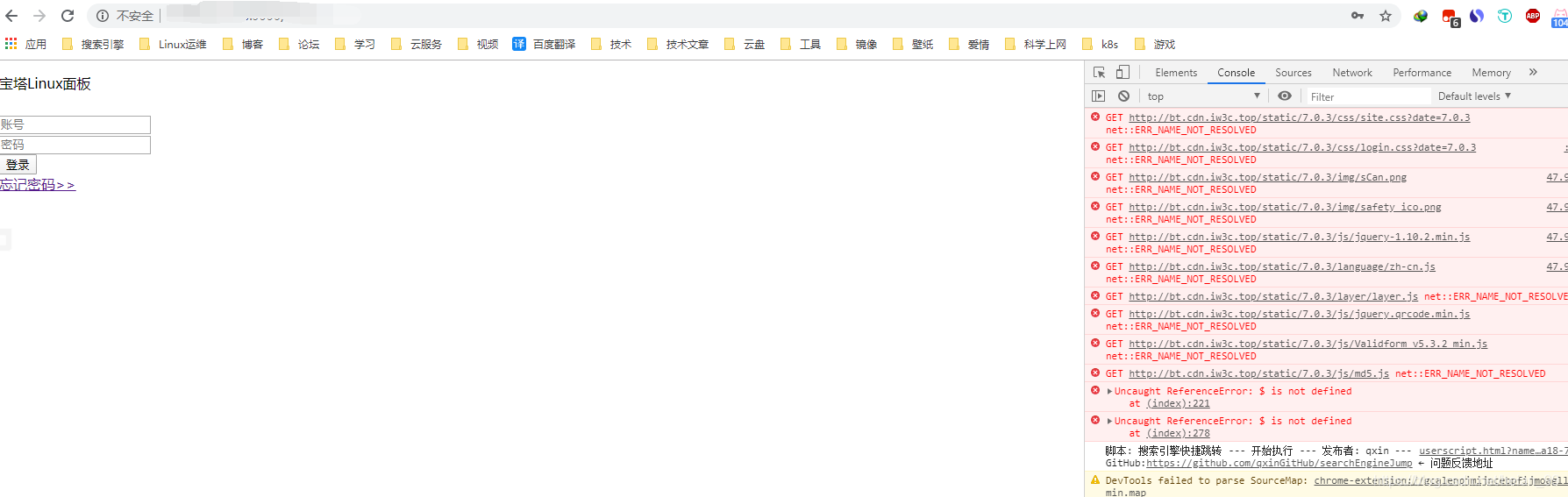
The issue turned out to be pretty simple in principle: BaoTa’s official CDN appeared to be down.
The troubleshooting path was also straightforward:
- Set up another local server and install BaoTa there to compare behavior
- Confirm that the local environment worked normally
- Compare it against the production machine and verify the production CDN resources were the problem
- Copy the usable CDN files from the local setup to the online server
That was the plan.
Then reality hit: I didn’t actually know BaoTa’s directory structure well enough.
In other words, the “solution” had not even begun yet.
The operation that blinded me on the spot
Don’t blink. What happened next was such a stupid move that it still hurts to look at.
The normal workflow was fine at first:
- Back up the files that were about to be modified. That part was pure professional instinct, and honestly, no problem there.
- Delete the files that seemed unnecessary.

The disaster happened during the delete step.
I had already backed everything up that I intended to touch. Then, while typing the delete command, I accidentally added one extra *.
And without thinking, I pressed Enter.
That feeling of instant regret? Extremely efficient.
Total panic mode
At that moment, Ctrl + C was already too late, and the despair was very real.
So yes, in spirit, it was basically time to book a one-way ticket to somewhere far, far away.


That one extra * ended up deleting the production server’s:
- nginx service
- PHP environment
- Redis cache
- MySQL database
Basically, the whole online runtime environment was gone.
No need for extra commentary. At that point the instinct was simple: run.


Flight delayed, company noticed, escape failed
The “run away” plan obviously did not work.
The outage was discovered immediately.
Capture on the spot.
What to do after accidental deletion
Since there was no proper local backup or offsite backup on this server, recovery became the only real option. Otherwise, this should have been a simple restore job.

The recovery process had three main steps:
- Stop all writes to the server and unmount the filesystem
- Install
extundeleteand scan the disk - Restore whatever data could still be recovered and rebuild the environment
1) Stop all writes immediately
Once you realize files were deleted by mistake, the first thing to do is stop any ongoing services and prevent any further disk writes. The more new data gets written, the lower the chance of successful recovery.
You can kill running processes directly:
<table> <thead> <tr> <th>1</th>
<th># killall 进程名</th>
</tr>
</thead>
<tbody>
<tr>
<td></td>
<td></td>
</tr>
</tbody>
</table>
or:
<table> <thead> <tr> <th>1</th>
<th># kill -9 pid</th>
</tr>
</thead>
<tbody>
<tr>
<td></td>
<td></td>
</tr>
</tbody>
</table>
Then remount the partition containing the deleted files as read-only:
<table> <thead> <tr> <th>1</th>
<th># mount -o ro /dev/sdb /data/</th>
</tr>
</thead>
<tbody>
<tr>
<td></td>
<td></td>
</tr>
</tbody>
</table>
2) Install extundelete
Use the following commands to install the required packages and download extundelete:
1 2</th>
<th>yum install bzip2 gcc-c++ e2fsprogs* -y wget http://nchc.dl.sourceforge.net/project/extundelete/extundelete/0.2.4/extundelete-0.2.4.tar.bz2</th>
</tr>
</thead>
<tbody>
<tr>
<td></td>
<td></td>
</tr>
</tbody>
</table>
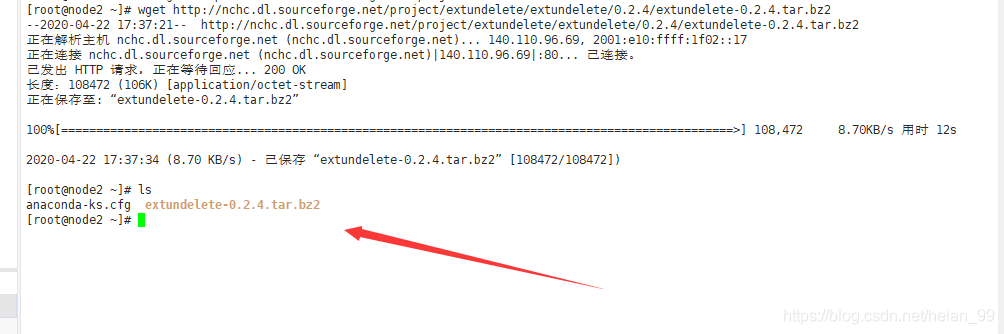
Extract and compile it:
<table> <thead> <tr> <th>1 2</th>
<th>tar jxvf extundelete-0.2.4.tar.bz2 cd extundelte-0.2.4</th>
</tr>
</thead>
<tbody>
<tr>
<td></td>
<td></td>
</tr>
</tbody>
</table>
<table>
<thead>
<tr>
<th>1 2</th>
<th>./configure make && make install</th>
</tr>
</thead>
<tbody>
<tr>
<td></td>
<td></td>
</tr>
</tbody>
</table>
Verify the installation result:
<table> <thead> <tr> <th>1</th>
<th>extundelete -v</th>
</tr>
</thead>
<tbody>
<tr>
<td></td>
<td></td>
</tr>
</tbody>
</table>
3) Scan and recover data
Recover a specific file or directory
The basic idea is to start from the root inode (inode=2), locate the inode of the deleted file, and then recover it.
Deleted directory:
/www/server
First, inspect which deleted files can still be found:
<table> <thead> <tr> <th>1</th>
<th>extundelete /dev/mapper/centos-root --inode 2</th>
</tr>
</thead>
<tbody>
<tr>
<td></td>
<td></td>
</tr>
</tbody>
</table>
<table>
<thead>
<tr>
<th>1</th>
<th>extundelete /dev/mapper/centos-root --inode 1703938</th>
</tr>
</thead>
<tbody>
<tr>
<td></td>
<td></td>
</tr>
</tbody>
</table>
<table>
<thead>
<tr>
<th>1</th>
<th>extundelete /dev/mapper/centos-root --inode 1703940</th>
</tr>
</thead>
<tbody>
<tr>
<td></td>
<td></td>
</tr>
</tbody>
</table>
Then attempt to restore the directory:
<table> <thead> <tr> <th>1</th>
<th>extundelete /dev/mapper/centos-root --restore-directory /www/server</th>
</tr>
</thead>
<tbody>
<tr>
<td></td>
<td></td>
</tr>
</tbody>
</table>
Some common restore commands:
<table> <thead> <tr> <th>1 2 3 4 5 6 7 8</th>
<th>#查看能恢复的数据: [root@localhost ~]# extundelete /dev/sdc1 --inode 2 #恢复单个文件 [root@localhost ~]# extundelete /dev/sdc1 --restore-file somefile #恢复目录 [root@localhost ~]# extundelete /dev/sdc1 --restore-directory /somedir #恢复所有文件 [root@localhost ~]# extundelete /dev/sdb1 --restore-all</th>
</tr>
</thead>
<tbody>
<tr>
<td></td>
<td></td>
</tr>
</tbody>
</table>
At this point, how much you get back depends a lot on luck.
The result
Luckily, the recovery worked.
Enough data was restored to rebuild the production environment, and after bringing the services back up, everything ran normally again.
Lessons burned into memory
- Always make backups
- Avoid using
rmcarelessly - Think twice before pressing Enter
The whole incident started with a server panel issue and ended with accidentally wiping nginx, PHP, Redis, and MySQL from production because of one extra *. The recovery succeeded, but only because the write activity was stopped quickly and extundelete still had something left to work with.
This kind of mistake feels dramatic in the moment, but the real takeaway is painfully practical: if backups had been in place, this would have been a routine restore instead of a near-death experience.