Building an AI-Powered Note Workflow for Engineering Knowledge Management
AI has changed note-taking from passive storage into an active knowledge system. A traditional notes app mostly keeps information in one place; an AI-driven workflow can capture, understand, connect, refine, and even help generate knowledge. That shift is what makes a new stack built around Obsidian, Claude Code, and OpenClaw so compelling for engineering work.
For anyone doing Android, Linux kernel, BSP, or embedded development, the real problem is rarely a lack of information. The problem is fragmentation: technical articles scattered across chat groups, logs stored in random folders, meeting decisions buried in documents, and hard-won debugging experience that never becomes reusable knowledge. This workflow is designed to close that loop from input to processing to output.
Why rebuild a note system in the AI era?
Over time, many engineers cycle through one note platform after another. Each migration costs time: reorganizing old material, adapting to new habits, rebuilding structure, and re-learning the tool. In the past, it was possible to settle on a stable combination of knowledge-base products and stop there.
That no longer feels sufficient. AI has raised the ceiling. Notes are no longer just a place to dump information. They can become a working partner that helps extract key ideas, identify relationships, organize concepts, and turn raw material into durable engineering knowledge.
The combination of Obsidian + Claude Code + OpenClaw aims to do exactly that. Obsidian serves as the local-first knowledge base, Claude Code handles intelligent processing, and OpenClaw automates external information capture. Together they form a practical loop:
- capture information from outside sources
- convert it into a usable format
- sync it into the vault
- analyze and structure it with AI
- archive it into a reusable knowledge system
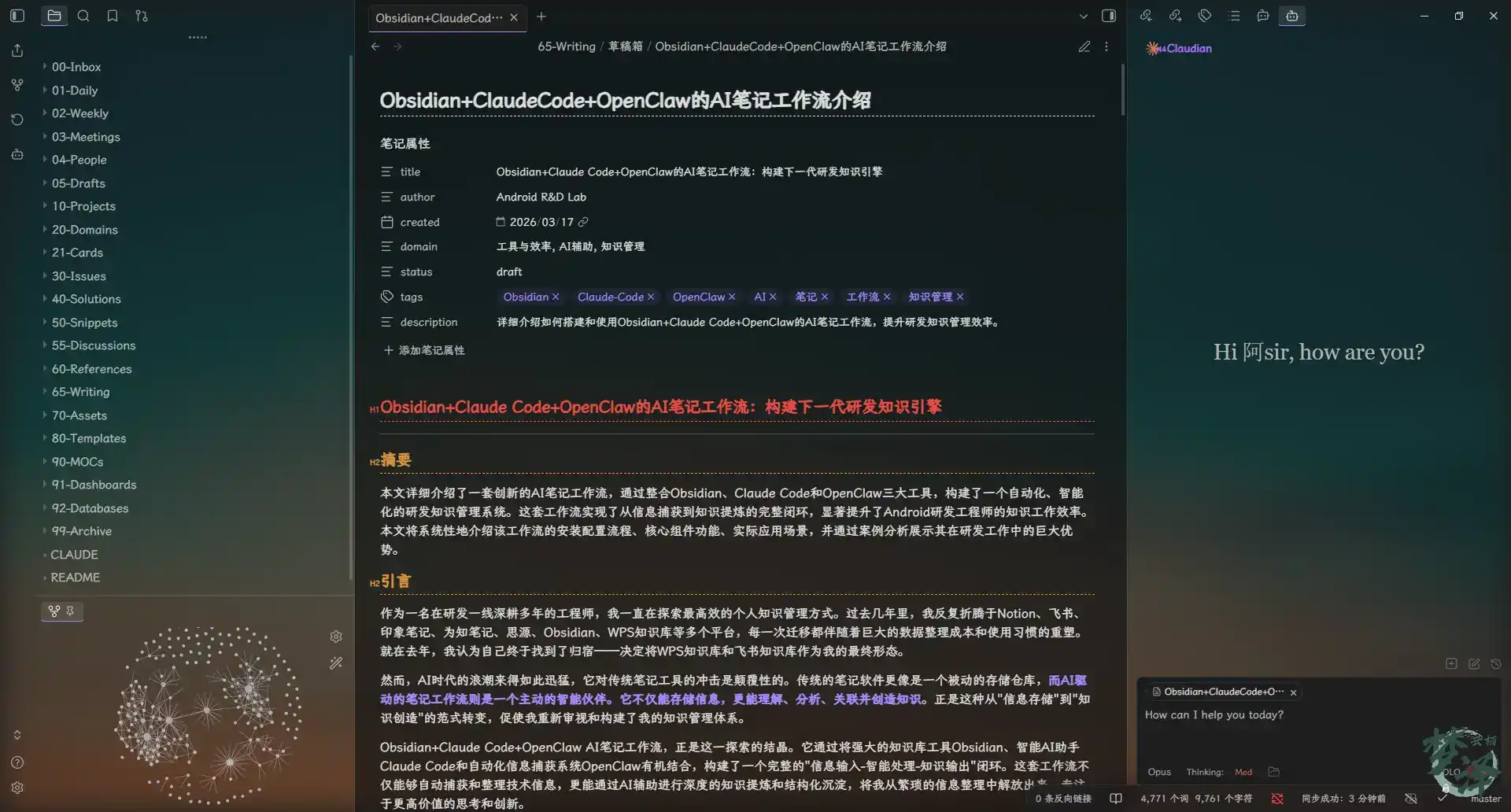
The three core components
Obsidian: the knowledge base itself
Obsidian is the foundation of the whole setup.
Its strengths are straightforward but important:
- native Markdown support
- bidirectional links and graph-based discovery
- a strong plugin ecosystem
- local storage with full data control
That combination makes it a better long-term home for technical knowledge than many cloud-first tools.
Claude Code: the AI layer
Claude Code is what turns the vault from a repository into an active system.
Its role goes beyond answering questions. It can:
- work inside Obsidian with tight integration
- understand technical concepts in natural language
- handle multi-step workflows
- read and write files
- execute commands
- function as a real AI agent rather than only a chatbot
That matters when the task is not just “summarize this,” but “analyze this kernel crash log, find related cases, draft a reusable solution, and store it in the right place.”
OpenClaw: automated capture
OpenClaw handles the messy front end of knowledge work: getting useful external content into the vault without manual copying and formatting.
Its main capabilities include:
- receiving links through a Feishu bot
- downloading web content automatically
- converting pages into Markdown
- supporting sources such as WeChat public accounts and technical blogs
- standardizing the intake process
This is what removes the repetitive work that usually discourages people from maintaining a serious knowledge base.
Workflow overview
At a high level, the pipeline looks like this:
外部信息源
     ↓
[飞书消息] → [OpenClaw] → [自动下载 & 转换] → [Obsidian Inbox]
     ↓                             ↑
[微信公众号]                      [Claude Code]
     ↓                             ↑
[技术博客]    ←←←←←←←←←←←←←←←←←←←
The idea is simple:
- send a link or content into the intake channel
- let OpenClaw fetch and convert it
- store the result in the Obsidian inbox
- use Claude Code to process, refine, and classify it
- connect it to the rest of the vault
This closes the gap between information collection and knowledge creation.
A vault structure built for engineering work
A good AI workflow still depends on a clear information architecture. The vault in this setup is deliberately structured so raw input, working notes, long-term knowledge, and outputs do not get mixed together.
Key directories include:
00-Inbox: temporary storage for uncategorized material such as ideas, web clips, logs, code snippets, and chat excerpts. The rule is capture first, organize later.01-Daily: daily work notes used to record tasks, problems, observations, conclusions, and next-day plans.02-Weekly: weekly reviews that consolidate daily notes into a structured summary.03-Meetings: meeting records organized by type, including decisions, action items, technical feedback, and ownership.04-People: collaborator notes covering colleagues, vendors, partners, responsibilities, interfaces, and context.05-Drafts: staged drafts, separated by maturity.10-Projects: project-specific documentation with a standardized structure.20-Domains: long-term reusable principle-level knowledge organized by domain.21-Cards: atomic knowledge cards and quick reference notes distilled from deeper material.30-Issues: case-based problem analysis, including symptoms, investigation path, root cause, solution, and validation.40-Solutions: generalized methods extracted from concrete issues.50-Snippets: reusable commands, code, scripts, DTS fragments, log-analysis snippets, regex, and templates.55-Discussions: deeper technical write-ups generated from extended discussion with AI.60-References: official docs, platform docs, vendor materials, books, standards, and links.65-Writing: output content such as technical articles, presentations, and published archives.70-Assets: non-Markdown files such as images, logs, captures, packet traces, and recordings.80-Templates: templates for recurring note types.90-MOCs: maps of content used as navigation hubs.91-Dashboards: work dashboards for quick access and tracking.99-Archive: historical and inactive material kept out of the main workspace.
This structure matters because AI works better when the workspace already has strong boundaries and conventions.
Installation and setup
Basic environment
The setup requires:
- a Windows, Linux, or macOS machine to run Obsidian and Claude Code
- a remote server such as a VPS to deploy OpenClaw
- stable connectivity between local devices and the server
- roughly 100 GB of storage for the knowledge base and attachments
Software dependencies include:
- Node.js 16 or later for OpenClaw
- Python 3.8 or later for supporting scripts
- Git for version control and synchronization
- Tailscale for secure point-to-point networking if the vault is hosted on a home NAS
Tailscale is optional, but useful when the note repository lives on a NAS in a separate network.
Deploying OpenClaw
Server-side deployment can be done with:
# 使用一键部署脚本
curl -fsSL https://openclaw.ai/install.sh | bash
Then start the service:
openclaw onboard
Optional Tailscale networking
If the server and NAS are not on the same network, Tailscale can provide a secure tunnel.
Installation commands:
# 在服务器上安装Tailscale
curl -fsSL https://tailscale.com/install.sh | sh

# 在本地设备上安装Tailscale
# Windows: 下载安装包 https://tailscale.com/download
# Mac: brew install tailscale
# Linux: curl -fsSL https://tailscale.com/install.sh | sh
Start it on both server and local device:
# 在服务器和本地设备上都执行
sudo tailscale up
After that, confirm in the Tailscale admin panel that all devices are online and reachable.
Obsidian configuration
Install Obsidian and point a new vault to the chosen local or NAS directory.
For WebDAV sync, configure:
- open Settings in Obsidian
- go to the Sync tab
- enable sync
- set WebDAV values
- URL:
http://[Tailscale-IP]:5005/webdav - 用户名:
your-username - 密码:
your-password
Essential plugins
The workflow relies on several community plugins:
- Claudian: embeds Claude Code into Obsidian
- remotely-save: improved WebDAV sync support
- simpread: web content extraction and conversion
- github-copilot: AI coding assistant integration
- obsidian-paste-image-rename: automatic image renaming
- obsidian-custom-attachment-location: custom attachment paths
- obshare: Feishu sharing support
Claude Code integration
To install Claudian:
- open Community Plugins in Obsidian
- search for
Claudian - install it
- restart Obsidian
GitHub Copilot integration is optional. Claude Code already has its own model access, so Copilot is only useful if you already subscribe and want to take advantage of it.
What this workflow looks like in real use
The value of this setup is easiest to see in day-to-day engineering tasks.
Capturing and processing technical articles
A common scenario: you see a strong technical article in a chat group, perhaps something on ARM page table attributes, and want to preserve it properly.
The manual way
Normally this means:
- copy the link
- open it in a browser
- copy sections into a notes app
- clean up the formatting
- add tags and links
- file it manually
That usually takes 15 to 30 minutes, and the result is often inconsistent.
The AI-driven way
With this workflow:
- send the article link to a Feishu bot
- OpenClaw downloads the content and converts it to Markdown
- the file syncs into the Obsidian inbox through WebDAV
- Claude Code analyzes the content
- key ideas are extracted into a structured note
- the note is archived into the correct domain
Typical time: 2 to 3 minutes, most of it automated.
A captured note can look like this:
# ARMv8/ARMv9页表属性(Page Descriptor)详解

> **知识来源**:OpenClaw下载文章 [armv8armv9页表属性page-descriptor的详细介绍](https://mp.weixin.qq.com/s/yTSWpq7Wtfh8hSXWkg0FLA)
> **捕获时间**:2026-03-17 01:15:17
> **知识领域**:Linux内核、ARM架构、CPU缓存、内存管理

## 概述
ARMv8/ARMv9架构中的页表属性(Page Descriptor)是内存管理单元(MMU)的核心组成部分...

## Stage 1页表属性详解
### 关键属性位说明
#### 1. PBHA (bits[62:59])
- **功能**:用于FEAT_HPDS2特性
- **作用**:Hierarchical Permission Descriptor扩展

#### 2. XN/UXN (bit[54])
- **功能**:Execute-never或Unprivileged execute-never
- **作用**:特权和非特权不可从该内存区域执行指令的标志位
The advantage is not just speed. It is the consistency of the result: standardized formatting, complete capture, and immediate readiness for deeper knowledge extraction.
Debugging issues and turning them into reusable knowledge
Another strong use case is kernel crash analysis.
The manual path
The usual process is familiar:
- copy a
dmesglog - search for similar problems
- read several articles
- organize the findings manually
- write a report
This can easily take one to two hours, and important clues are easy to miss.
The AI-assisted path
In this setup:
- paste the log into Obsidian
- ask Claude Code to analyze it
- let it generate an issue-analysis framework
- search the vault for related past cases
- extract a more general solution pattern
- generate a reusable knowledge card
Typical time: 15 to 20 minutes.
The important difference is that the output does not stop at one solved incident. It becomes part of a growing issue library and solution methodology.
Meeting notes and action tracking
Technical reviews often suffer from the same problems: incomplete notes, scattered tasks, and poor follow-up.
With a template-driven workflow:
- create the meeting note before the meeting
- record points in real time
- use Claude Code afterward to distill decisions and conclusions
- generate a clean action-item list
- link people and projects involved
- track progress from the daily note system
Instead of spending one to two hours cleaning up after the meeting, the process drops to roughly 30 to 45 minutes while producing more structured output.
Knowledge cards: the most useful long-term layer
One of the most practical parts of this system is the knowledge card layer.
When a captured article is especially good, it can be distilled into one or more compact cards for repeated learning and later AI interaction. This turns passive reading into an active memory and retrieval system.
The extraction rules
The card-generation behavior is governed by an explicit set of rules:
**将文章精炼成知识卡片**:
    1. **接收指令**:当收到"请将这篇文章/内容精炼成知识卡片"的指令时或者使用"/card"触发,立即启动该流程。
    2. **重复检测(关键步骤)**:
        - 创建前**必须检查** `21-Cards` 目录下是否已有相同或相似主题的卡片。
        - 使用 `Glob` 工具搜索 `21-Cards/*.md` 获取现有卡片列表。
        - 根据内容重合度判断处理方式:
            - **>70%(高度相似)**:补充到现有卡片,而非新建。向用户说明后,在原有卡片上扩展内容。
            - **30%-70%(相关但不同)**:新建卡片,但必须在「关联笔记」中添加指向已有卡片的双向链接。
            - **<30%(全新主题)**:直接新建卡片。
        - 如果发现相似卡片,**主动告知用户**并提供建议(新建/补充/合并)。
    3. **提炼内容**:
        - 仔细分析你提供的文章、笔记或选中的文本。
        - 提取其中的核心概念、关键结论、重要命令、最佳实践和可复用的要点。
        - 按照 `80-Templates/知识卡片模板.md` 的格式,创建一张或者多张(需要根据知识点的数量)内容精炼、结构清晰的 Markdown 卡片。
    4. **智能打标签**:
        - 根据卡片内容,自动为其添加最相关的标签。
        - 例如,一张关于内核崩溃(Kernel Panic)分析的卡片,会添加 `#card/concept`、`#domain/linux-kernel`、`#kernel/panic` 等标签。
        - 这确保了卡片能被系统化地分类和检索。
        - 开头的添加的格式,以下方为例子
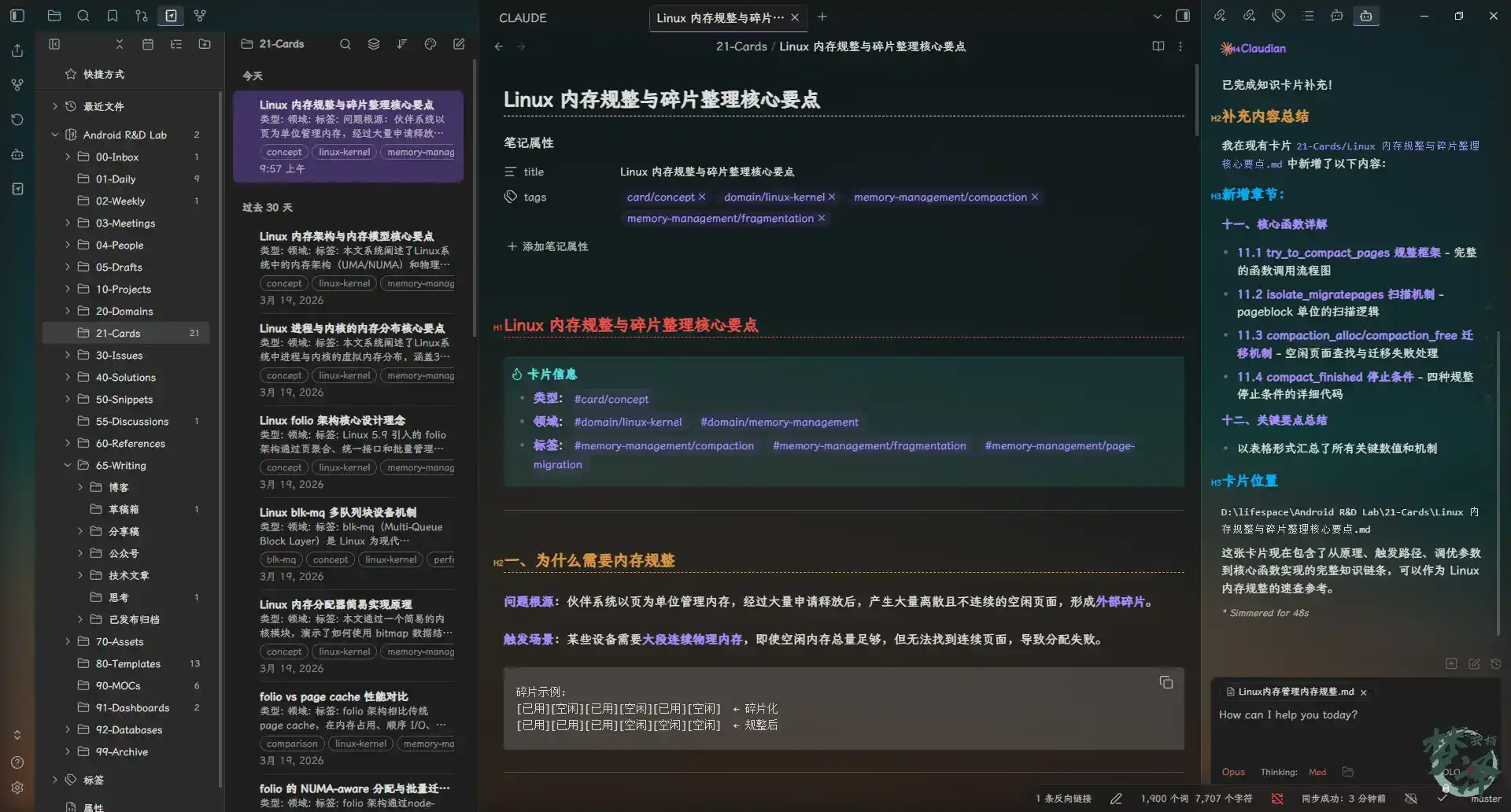
[!tip] 卡片信息 - 类型: #card/concept - 领域: #domain/linux-kernel #domain/memory-management - 标签: #memory-management/LRU #memory-management/page-reclaim
    5. **链接与聚合**:
        - 要在卡片中添加双向链接,将其关联到 `30-Issues` 中的原始案例(如果存在)和 `20-Domains` 中相关的深度原理文章。
        - **必须检查** `90-MOCs` 中的相关 MOC(如"Linux 内核 MOC"),并将新创建的卡片链接到该 MOC 中,确保知识地图的完整性。
        - **主动创建预期链接**:在分析原文和上下文后,如果推断出某个核心概念或机制**极有可能**在未来的某个特定场景(如特定项目、问题类型)中被应用或出现问题,则应主动创建一个链接。该链接的命名应**严格遵循您知识库的标准化命名规则**(例如 `平台_项目_问题类型_问题简述.md`)。
        - **关联已有卡片**:如果步骤 2 中发现相关卡片,必须在「关联笔记」中添加指向它们的双向链接。
    6. **创建与通知**:
        - 最后,将这张打好标签、已链接的卡片,保存到 `21-Cards` 目录下。
        - 通知我卡片已创建,并告知名称和位置,以便我随时查阅。
        - 如果是补充到现有卡片,说明补充了哪些内容。
The duplicate check is especially important. A card system becomes valuable only if it avoids fragmentation. When the AI detects a strong overlap with an existing card, it expands the old one instead of blindly creating a near-duplicate.
What the refinement process looks like
In practice, the card workflow behaves as expected:
- if the concept already exists in the card library, the AI appends useful new details
- if the topic is related but distinct, it creates a separate card and links both
- if it is genuinely new, it opens a fresh card
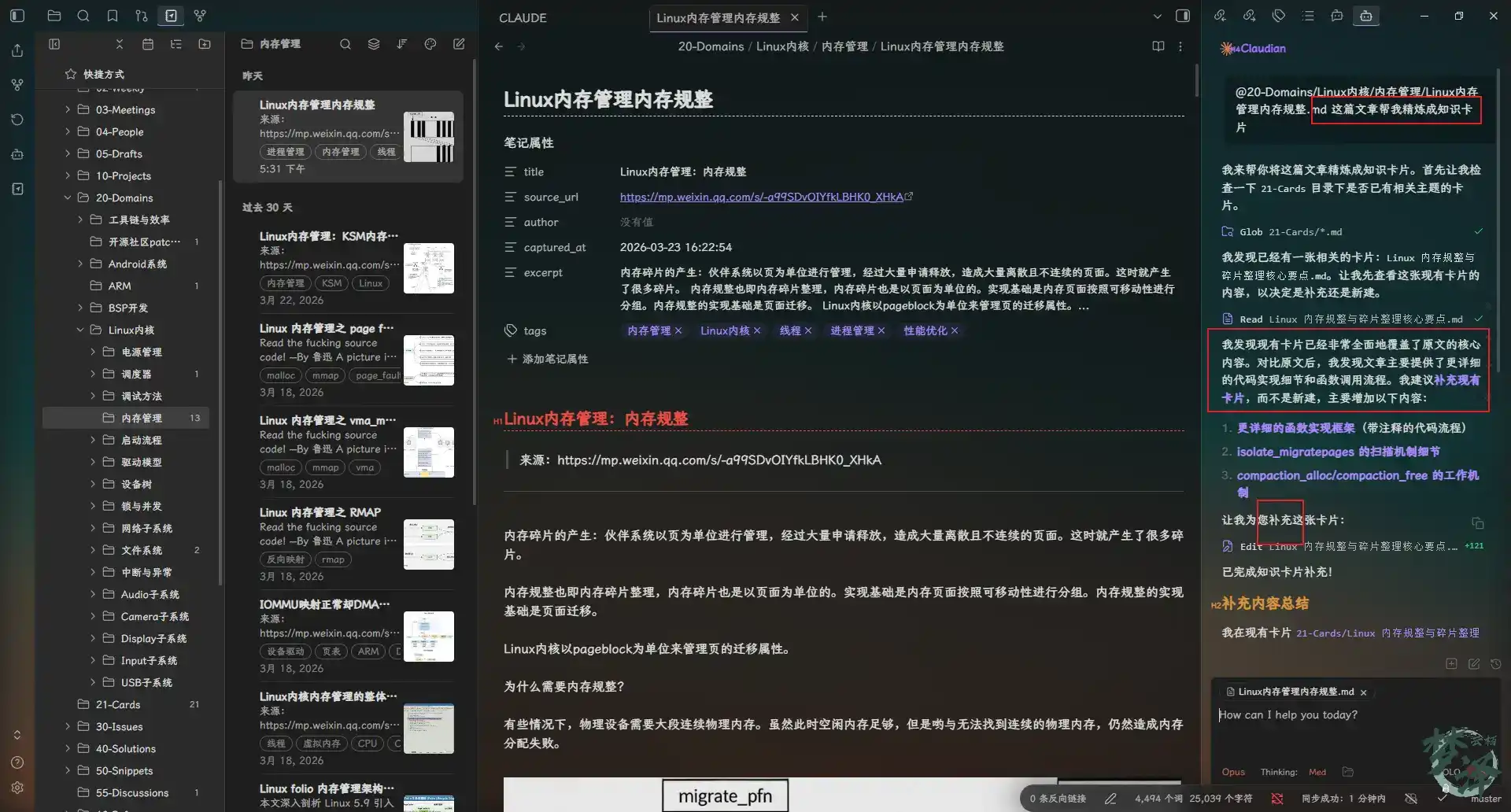
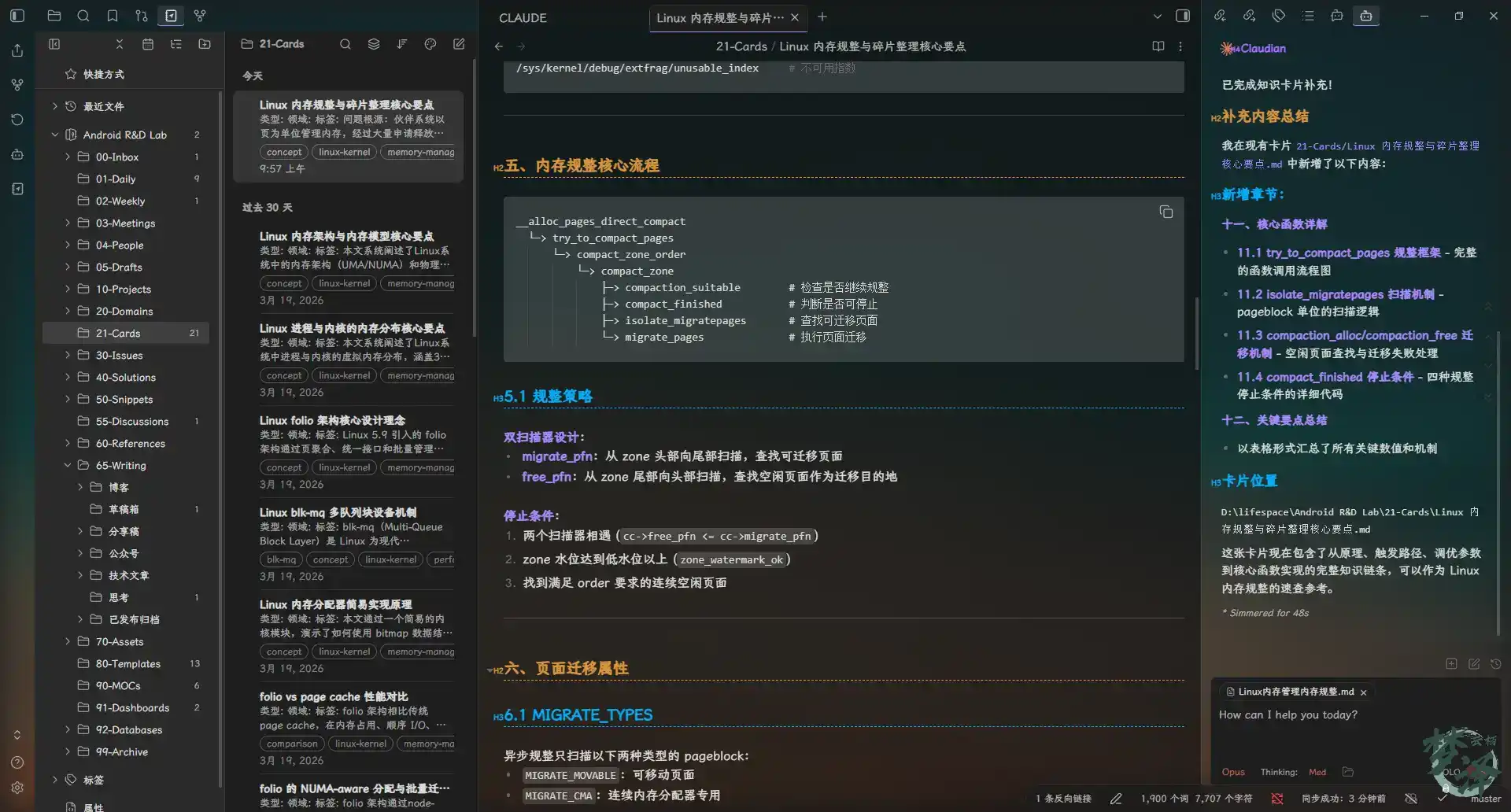
The resulting cards are concise, tagged, linked, and built to be used again.
Studying by “drawing cards” at random
This is where the system becomes more than a filing cabinet.
During spare moments, a card can be pulled at random for review. For example, asking the AI to pick a card on memory compaction and generate several multiple-choice questions based on its key points.
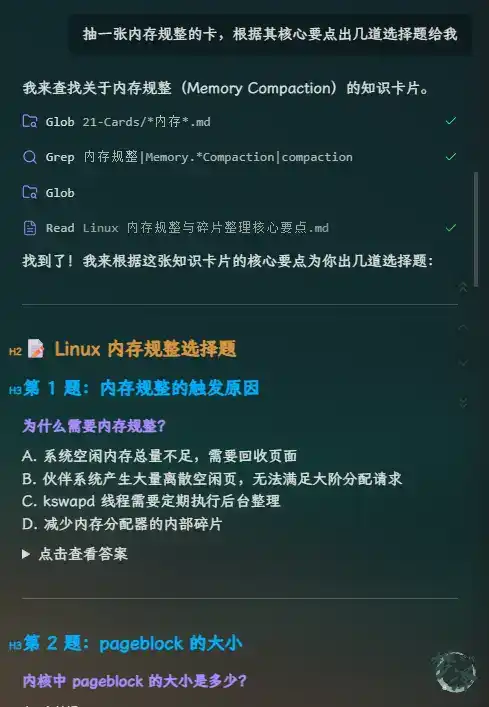
It can also use a single card as the starting point for a deeper discussion.
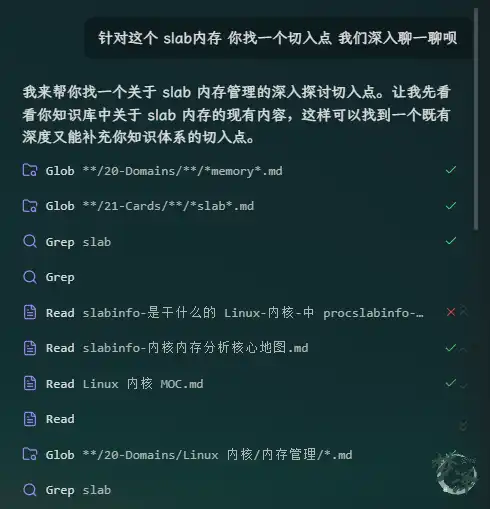
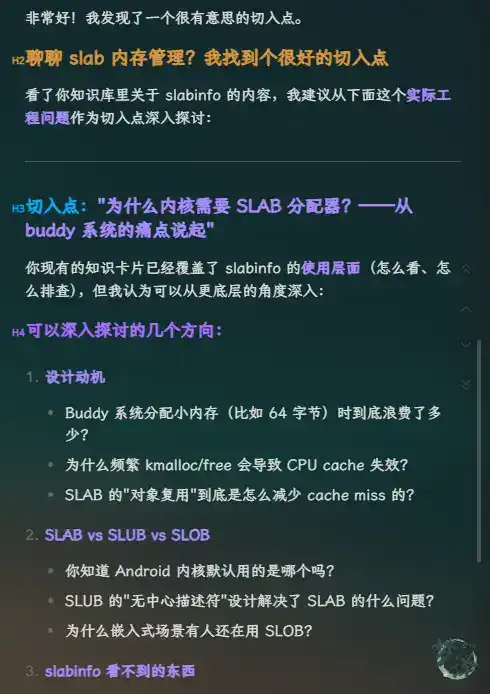
For instance, if the topic is tracing slab allocation behavior, the conversation can branch from the card into concrete debugging strategy.
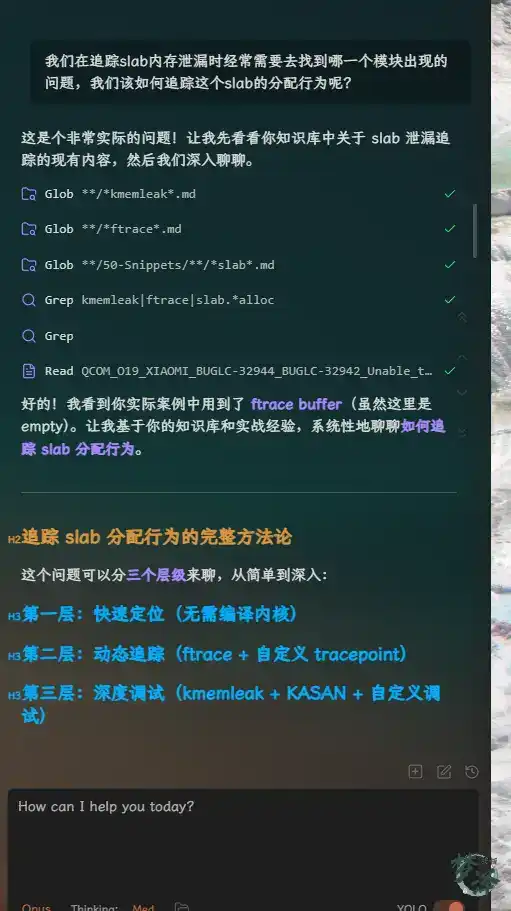
After the discussion, the AI can summarize the exchange into an article, record incorrect answers, or save the explored concepts into the day’s work note. Once the structure is in place, the system becomes flexible enough to support different working styles.
Daily work notes as an active workspace
Another useful part of the setup is automated daily note generation.
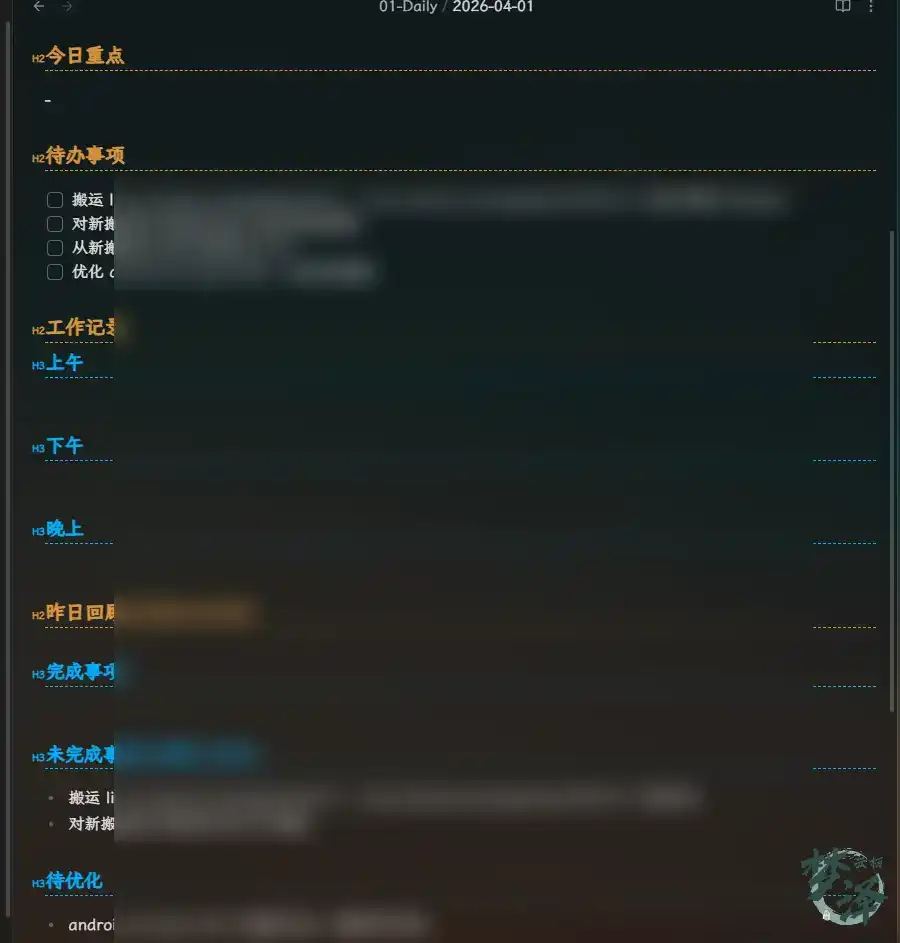
With the right templates and rules, Claude Code can create the day’s task note directly. It can also bring forward unfinished tasks from the previous day into today’s to-do list. The same idea could be extended further by pulling in additional sources such as JIRA ticket status or daily industry news.
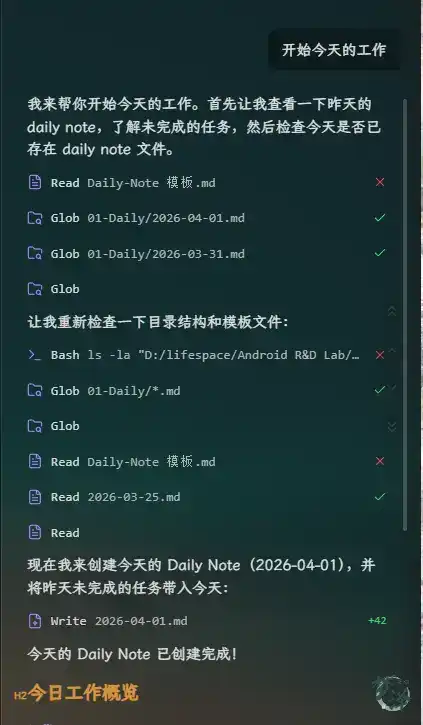
The generated work note becomes a practical control center for the day.
One-click sharing to Feishu
If Feishu is already the communication platform used at work, notes also need an efficient way to move back out.
That is where the obshare plugin fits in. Once configured with the Feishu bot settings inside Obsidian, a note can be uploaded to a specified Feishu cloud folder with one click.
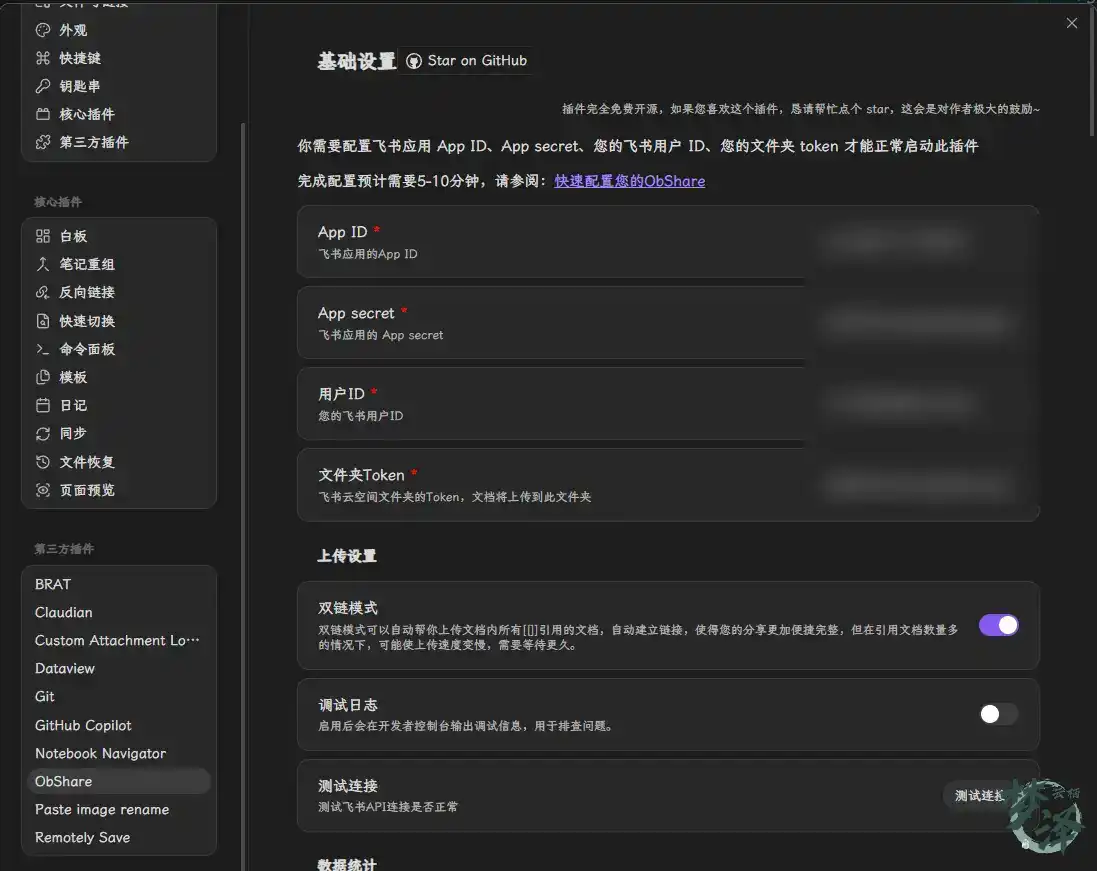
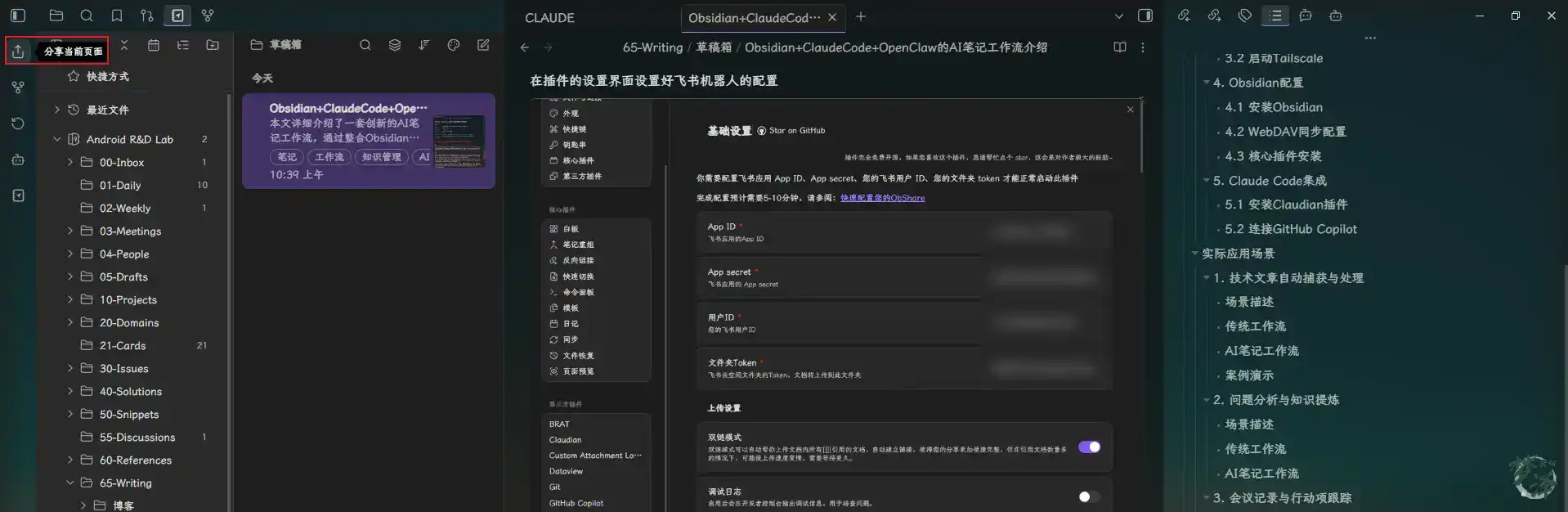
This matters because a useful knowledge workflow should not only capture and refine information, but also make distribution easy when the output needs to be shared with a team.
Efficiency gains
The time savings are significant.
<table> <thead> <tr> <th>Task</th> <th>Traditional time</th> <th>AI workflow time</th> <th>Efficiency gain</th> </tr> </thead> <tbody> <tr> <td>Technical article organization</td> <td>15-30 minutes</td> <td>2-3 minutes</td> <td>5-8x</td> </tr> <tr> <td>Issue analysis report</td> <td>1-2 hours</td> <td>15-20 minutes</td> <td>3-4x</td> </tr> <tr> <td>Meeting note cleanup</td> <td>1-2 hours</td> <td>30-45 minutes</td> <td>2-3x</td> </tr> </tbody> </table>Beyond raw time savings, the workflow improves the entire knowledge pipeline:
- automatic archiving reduces manual filing work
- structured extraction turns unstructured input into reusable knowledge
- linked discovery surfaces relationships between domains, issues, and solutions
Why it works better than a traditional note workflow
A side-by-side comparison makes the difference clearer:
<table> <thead> <tr> <th>Dimension</th> <th>Traditional notes</th> <th>AI note workflow</th> <th>Advantage</th> </tr> </thead> <tbody> <tr> <td>Information capture</td> <td>Manual copy-paste</td> <td>Automated capture and conversion</td> <td>Saves time, reduces errors</td> </tr> <tr> <td>Knowledge organization</td> <td>Manual sorting, often messy</td> <td>AI-assisted structuring</td> <td>Better quality and consistency</td> </tr> <tr> <td>Knowledge links</td> <td>Manually added</td> <td>Bidirectional links and graph navigation</td> <td>Reveals hidden relationships</td> </tr> <tr> <td>Reuse</td> <td>Hard to retrieve and apply</td> <td>Easy to search and reference</td> <td>Higher knowledge utilization</td> </tr> <tr> <td>Overall workflow</td> <td>Slow and labor-intensive</td> <td>Automated and efficient</td> <td>Strong productivity gains</td> </tr> </tbody> </table>The real gain is not simply writing notes faster. It is building a system where technical experience becomes searchable, connected, and reusable.
Quality and reliability
A workflow like this also improves output quality.
Better completeness
- automated capture reduces the chance of missing key information
- AI-assisted analysis helps surface important points
- templates provide a more complete structure for reports and notes
More consistent formatting
- Markdown gives a unified format for reading and exporting
- templates make repeated note types consistent
- automation removes many small manual errors
Searchability, reuse, and growth
This kind of vault gets stronger over time because new material does not stay isolated.
- full-text search makes retrieval fast
- the tag system supports multi-dimensional classification
- bidirectional links turn notes into a navigable network
- specific issue cases can evolve into broader solution patterns
- knowledge cards condense deeper material into fast-learning units
Instead of a pile of documents, the result is a living engineering knowledge base.
Security and privacy
For engineering teams, especially those handling internal project information, security cannot be an afterthought.
Data security
- the vault is stored locally on a NAS rather than uploaded wholesale to third-party platforms
- WebDAV transmission can use HTTPS encryption
- NAS-side user permissions can restrict access
AI safety
- Claude Code can be limited to operating within the local knowledge base
- explicit permission boundaries reduce the risk of unwanted actions
- audit logs can record the assistant’s operations for later review
Backup strategy
- configure regular NAS backups to external drives
- use Git for version control of the knowledge base
- sync important documents to encrypted cloud storage as an extra layer
Common problems and practical fixes
OpenClaw conversion quality can vary
Some complex pages may convert poorly.
Possible fixes:
- switch OpenClaw to a different conversion engine
- manually clean up the resulting Markdown when needed
- create custom conversion rules or skills for recurring source types
Claude Code may misunderstand technical concepts
This is unavoidable in specialized engineering domains.
Ways to improve the result:
- provide richer context in the prompt
- review and correct AI-generated content manually
- build stronger domain-specific prompt templates
WebDAV sync may be unstable
If network quality fluctuates, sync can fail.
Possible fixes:
- use Tailscale for a more stable private connection
- enable retry mechanisms where available
- check sync status regularly instead of assuming it succeeded
Where this can go next
There is still room to expand the workflow.
Workflow improvements
- add video-to-text processing for Bilibili or YouTube technical content
- support voice notes that can be transcribed and structured automatically
- introduce recommendation features based on the knowledge graph
Stronger AI capabilities
- multimodal analysis for images and diagrams
- better understanding of complex codebases
- more personalized models shaped by the local knowledge base
Team-level collaboration
- shared knowledge bases for engineering teams
- collaborative editing workflows
- formal knowledge review mechanisms to maintain quality
Reference directory layout
A simplified structure can look like this:
Android R&D Lab/
├── 00-Inbox/
├── 01-Daily/
├── 03-Meetings/
├── 10-Projects/
├── 20-Domains/
│   ├── ARM/
│   ├── Linux内核/
│   └── Android系统/
├── 30-Issues/
├── 40-Solutions/
├── 50-Snippets/
├── 60-References/
├── 65-Writing/
│   └── 草稿箱/
├── 70-Assets/
├── 80-Templates/
├── 90-MOCs/
└── .obsidian/
The larger point is not that every engineer should copy this structure exactly. It is that an AI-native knowledge system works best when intake, processing, retrieval, and output are all deliberately designed.
For development work, that can be a major shift: fewer scattered notes, less repetitive cleanup, faster debugging, better reuse, and a knowledge base that becomes more valuable the more it is used.