Building Smarter AI Movement in Unity with Agent, Steering, Seek, Pursue, Flee, and Evade
This section focuses on the basic structure behind smarter AI movement in Unity, centered on the first group of steering behaviors. The core idea is simple: separate movement execution from movement decision-making, then let individual behaviors supply the data the agent needs.
The three core classes
The whole setup revolves around three classes, each with a clear role:
- Agent handles movement values for the current frame and prepares movement for the next one.
- AgentBehaviour abstracts the steering calculation process.
- Steering stores the data the
Agentneeds in order to update motion.
With this structure, adding a new movement behavior does not require changing the whole system. In most cases, it is enough to create another class derived from AgentBehaviour.
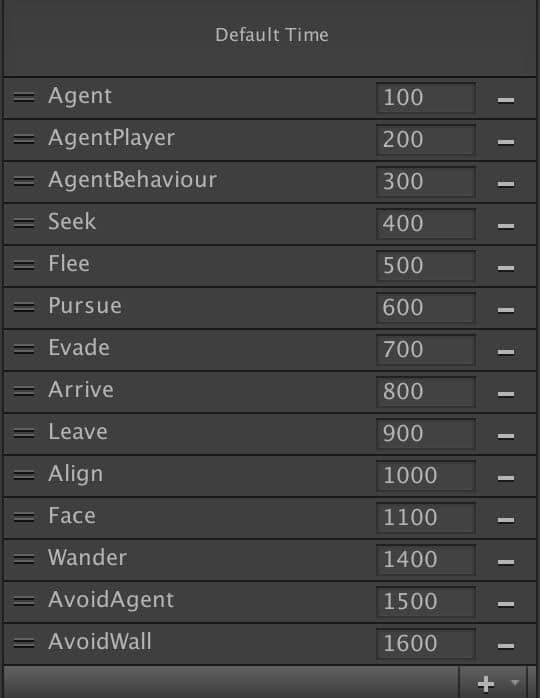
Script execution order
Because these scripts depend on each other, call frequency matters. The Agent script, which detects and applies AI movement, runs most frequently. Scripts derived from AgentBehaviour come after that.
Base architecture
The Agent / AgentBehaviour / Steering combination provides a minimal foundation for AI movement.
There are also some obvious code smells in this version. For example, Steering is instantiated with new, and every behavior creates a fresh Steering object when returning from GetSteering(). That can absolutely be avoided, but optimization is not the topic here, so it is only worth pointing out rather than solving.
Agent
Agent computes movement and orientation using Update and LateUpdate.
The actual movement applied to the GameObject is very small in scope: only Translate and Rotate are used.
- Update: applies the current frame's displacement and orientation
- LateUpdate: calculates velocity and rotation values for the next frame
using UnityEngine;
using System.Collections;
public class Agent : MonoBehaviour {
    public float maxSpeed;
    public float maxAccel;
    public float orientation;
    public float rotation;
    public Vector3 velocity;
    protected Steering steering;
    void Start () {
        velocity = Vector3.zero;
        steering = new Steering();
    }
    public void SetSteering (Steering steering) {
        this.steering = steering;
    }
    public virtual void Update () {
        Vector3 displacement = velocity * Time.deltaTime;
        orientation += rotation * Time.deltaTime;
        // we need to limit the orientation values
        // to be in the range (0 – 360)
        if (orientation < 0.0f)
            orientation += 360.0f;
        else if (orientation > 360.0f)
            orientation -= 360.0f;
        transform.Translate(displacement, Space.World);
        transform.rotation = new Quaternion();
        transform.Rotate(Vector3.up, orientation);
    }
    public virtual void LateUpdate () {
        velocity += steering.linear * Time.deltaTime;
        rotation += steering.angular * Time.deltaTime;
        if (velocity.magnitude > maxSpeed) {
            velocity.Normalize();
            velocity = velocity * maxSpeed;
        }
        if (steering.angular == 0.0f) {
            rotation = 0.0f;
        }
        if (steering.linear.sqrMagnitude == 0.0f) {
            velocity = Vector3.zero;
        }
        steering = new Steering();
    }
}
Steering as a data container
Steering carries the raw values the Agent needs. Since both AgentBehaviour and Agent rely on these values, the shape of this data directly affects the final movement result.
using UnityEngine;
using System.Collections;
public class Steering {
    public float angular;
    public Vector3 linear;
    public Steering () {
        angular = 0.0f;
        linear = new Vector3();
    }
}
AgentBehaviour as the behavior layer
AgentBehaviour acts as the data provider for Agent, so its main responsibility is extension through inheritance.
New behaviors derive from AgentBehaviour and override GetSteering() to define their own movement logic.
using UnityEngine;
using System.Collections;
public class AgentBehaviour : MonoBehaviour {
    public GameObject target;
    protected Agent agent;
    public virtual void Awake () {
        agent = gameObject.GetComponent<Agent>();
    }
    public virtual void Update () {
        agent.SetSteering(GetSteering());
    }
    public virtual Steering GetSteering () {
        return new Steering();
    }
}
Smarter movement behaviors
Once the base structure is in place, behaviors can be introduced by overriding GetSteering().
Seek
Seek is the most direct example of how the system is extended.
This behavior does two things:
- Gets the vector pointing toward the target
- Normalizes that direction and multiplies it by the current acceleration limit, producing a velocity-oriented steering vector toward the target
using UnityEngine;
using System.Collections;
public class Seek : AgentBehaviour {
    public override Steering GetSteering() {
        Steering steering = new Steering();
        steering.linear = target.transform.position - transform.position;
        steering.linear.Normalize();
        steering.linear = steering.linear * agent.maxAccel;
        return steering;
    }
}
Pursue
Pursue goes beyond simply moving toward the target's current position. It tries to predict where the target will be after a short amount of time and then seeks that future position instead.
Inside GetSteering(), the target to be chased is stored in targetAux, and a predicted position is assigned to target. The maxPrediction variable limits how far ahead the prediction can go. Like any value of this kind, it should stay within a sensible range.
The decision is based on this comparison:
speed <= distance / maxPrediction
Where:
speedis the actual speed of the chasing objectdistanceis the current distance to the targetmaxPredictionis the preset prediction time
From that, distance / maxPrediction gives a predicted speed over the chosen time window. That predicted value is then compared with the current speed.
If the predicted speed is lower than the real speed, then the prediction is likely too optimistic or simply not a good fit, so a more conservative value is recalculated with:
prediction = distance / speed;
The future displacement is then obtained with:
targetAgent.velocity * prediction
This approach works under the assumption that the target is moving at a constant speed, or possibly accelerating.
There is one obvious edge case: if the target suddenly stops, or is already stationary, execution timing can cause the pursuer to overshoot, pass through the target, and then oscillate back and forth. That problem needs another behavior layer to smooth things out.
public class Pursue : Seek {
    public float maxPrediction;
    private GameObject targetAux;
    private Agent targetAgent;
    public override void Awake() {
        base.Awake();
        targetAgent = target.GetComponent<Agent>();
        targetAux = target;
        target = new GameObject();
    }
    void OnDestroy () {
        Destroy(targetAux);
    }
    public override Steering GetSteering() {
        Vector3 direction = targetAux.transform.position - transform.position;
        float distance = direction.magnitude;
        float speed = agent.velocity.magnitude;
        float prediction;
        if (speed <= distance / maxPrediction)
            prediction = maxPrediction;
        else prediction = distance / speed;
        target.transform.position = targetAux.transform.position;
        target.transform.position += targetAgent.velocity * prediction;
        return base.GetSteering();
    }
}
Flee
Flee is the opposite of Seek. Instead of generating a steering vector toward the target, it produces one in the opposite direction.
using UnityEngine;
using System.Collections;
public class Flee : AgentBehaviour {
    public override Steering GetSteering() {
        Steering steering = new Steering();
        steering.linear = transform.position - target.transform.position;
        steering.linear.Normalize();
        steering.linear = steering.linear * agent.maxAccel;
        return steering;
    }
}
Evade
Evade follows the same prediction logic as Pursue, but its final movement behavior comes from the Flee side instead of Seek.
So at the prediction layer, Evade and Pursue are effectively the same. The difference appears in the inherited behavior used to react to the predicted position.
using UnityEngine;
using System.Collections;
public class Evade : Flee {
    public float maxPrediction;
    private GameObject targetAux;
    private Agent targetAgent;
    public override void Awake() {
        base.Awake();
        targetAgent = target.GetComponent<Agent>();
        targetAux = target;
        target = new GameObject();
    }
    public override Steering GetSteering() {
        Vector3 direction = targetAux.transform.position - transform.position;
        float distance = direction.magnitude;
        float speed = agent.velocity.magnitude;
        float prediction;
        if (speed <= distance / maxPrediction)
            prediction = maxPrediction;
        else prediction = distance / speed;
        target.transform.position = targetAux.transform.position;
        target.transform.position += targetAgent.velocity * prediction;
        return base.GetSteering();
    }
    void OnDestroy () { Destroy(targetAux); }
}
At this stage, the main point is not complexity but extensibility. Agent handles movement, Steering carries the raw motion data, and AgentBehaviour becomes the place where different AI behaviors are derived. On top of that base, behaviors like Seek, Pursue, Flee, and Evade can be added with relatively little structural change.